




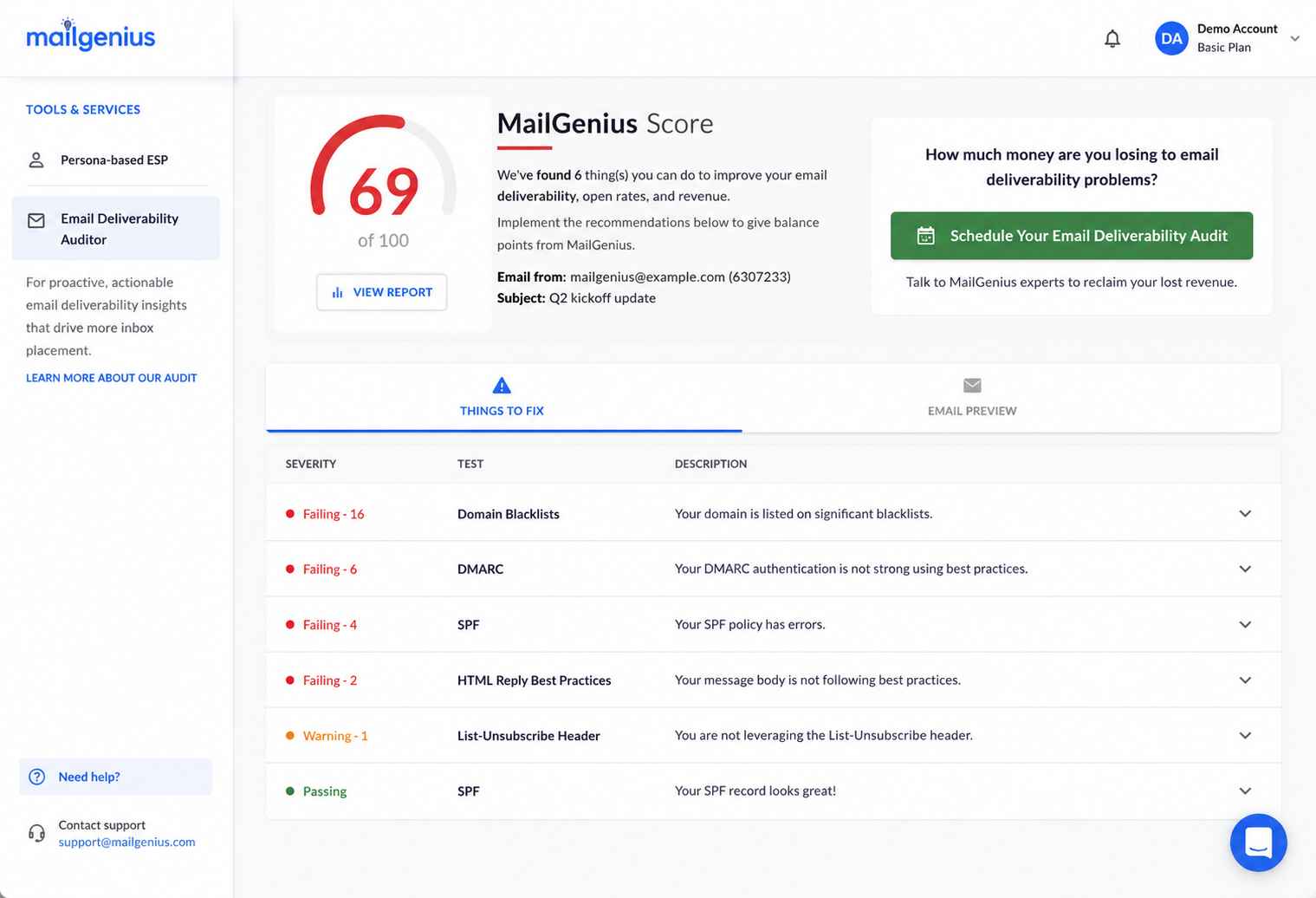
MailGenius positions itself as an email testing and deliverability diagnostic tool.
The core workflow is simple — send a test email to a MailGenius address and receive a report that scores your message against spam triggers, authentication records, and content issues. The platform also offers paid consulting services from deliverability experts, as well as subscription plans for ongoing testing.
Several Trustpilot reviewers praise the consulting team’s knowledge (particularly an expert named Jan, who appears in multiple positive reviews). G2 reviews are sparse — only 6 total — but generally positive.
However, the cracks show in the details. Trustpilot’s 3.5/5 rating across 17 reviews includes complaints about false blacklist results, aggressive follow-up emails after testing, and pricing transparency issues.
Capterra scores are harsher (2.5/5 from 2 reviews), with one reviewer calling customer service poor and the other finding it helpful but overpriced.
The platform sits in an awkward middle ground — too basic for enterprise teams, too expensive for casual users who just need a quick spam check.
In this review, we’ll be evaluating:
- Accuracy concerns from user feedback
- What MailGenius’s spam testing actually covers
- A stronger alternative that goes beyond diagnostics
- Where diagnostic testing fits in a deliverability strategy
- Pricing tiers and whether the consulting investment pays off
TLDR: MailGenius at a glance
Here is a quick summary of what MailGenius offers and where it falls in the deliverability landscape.
| Category | Detail |
| What it is | Email spam testing and deliverability diagnostic tool with consulting services |
| Best for | Small senders who need pre-send spam checks and occasional expert guidance |
| Deliverability impact | Diagnostic only — identifies problems but does not fix infrastructure or reputation |
| Main limitation | Limited test credits, reported blacklist inaccuracies, aggressive follow-up marketing |
| Best-fit user | Solo operators and small teams running occasional campaigns |
| Best alternative | Email deliverability test for unlimited inbox placement testing across 50+ providers |
Is MailGenius’s pricing justified for spam testing?
MailGenius offers three subscription tiers, each built around test credits:
- Newbie — $8/month for 10 test credits
- Standard — $20/month for 30 test credits
- Genius — $39/month for unlimited test credits
For teams running a handful of campaigns per month, the Newbie or Standard plans provide basic coverage. The Genius plan makes sense only for teams sending high-frequency campaigns that need pre-send checks before each batch.
The consulting services sit on top. Multiple Trustpilot reviewers mention booking 30-minute calls ($10-$297 range based on complexity) for DNS and authentication fixes.
The consulting reviews are positive — users describe the experience as knowledgeable and hands-on. But the cost adds up for teams with multiple domains or ongoing authentication needs.
Compared to free alternatives like Mail-Tester (which offers similar scoring), MailGenius’s paid plans are harder to justify unless you value the consulting layer.
The diagnostic reports themselves are not unique — multiple tools provide the same authentication, content, and blacklist checks.
What MailGenius’s testing reveals (and misses)
The spam testing workflow is simple. Send an email to a MailGenius test address, wait for the report, and review the results across authentication, content, and reputation categories.
Authentication checks
MailGenius evaluates SPF, DKIM, and DMARC records. The reports surface misconfigured or missing records and provide recommendations for fixes.
For senders who have never audited their DNS records, the authentication checks add real value — these are the same issues that consultants charge hundreds of dollars to diagnose.
Blacklist monitoring
MailGenius checks sending domains and IPs against major blacklists.
However, at least two Trustpilot reviewers report false blacklist results — domains flagged as blacklisted that were confirmed clean through direct blacklist checks.
MailGenius’s response to these complaints suggests the results are pulled directly from the blacklists themselves, but the discrepancies undermine trust in the reporting.
Content analysis
The platform reviews email content for elements that may trigger spam filters (broken links, unfavorable text-to-image ratios, and spam-associated phrases).
The content scoring provides a useful pre-send sanity check, though it cannot replicate how individual mailbox providers (Gmail, Outlook, Yahoo) actually evaluate messages.
Pros and cons of MailGenius
MailGenius fills a narrow space — pre-send diagnostics with optional human expertise. The tradeoffs are significant for teams with ongoing deliverability needs.
- Simple send-to-test workflow requires no technical setup
- Authentication, content, and blacklist checks in a single report
- Consulting calls praised for knowledgeable, hands-on guidance
- Actionable recommendations for DNS and authentication fixes
- False blacklist results reported by multiple Trustpilot reviewers
- Aggressive follow-up marketing emails after testing
- Limited free testing — paid plans required for regular use
- Only 6 G2 reviews (4 of which are incentivized) — limited independent validation
- Diagnostic-only — no tools to actually fix or monitor issues
Who should and shouldn’t use MailGenius
MailGenius works best as an occasional diagnostic tool for senders who need a pre-campaign sanity check. The platform is not a deliverability solution — it is a snapshot that tells you what is wrong without providing tools to fix it.
Who should use MailGenius
- Solo operators who want a quick spam check before sending a newsletter
- Small teams that need occasional consulting calls for DNS or authentication issues
- Senders who have never tested their email configuration and want a baseline assessment
Who shouldn’t use MailGenius
- Anyone who requires blacklist monitoring with verified accuracy
- High-volume senders who need unlimited testing across multiple domains
- Teams that need ongoing deliverability monitoring (not one-time snapshots)
- Organizations that need authentication setup, reputation repair, and infrastructure fixes
MailGenius scorecard for deliverability-focused teams
Here is how MailGenius rates across categories relevant to teams evaluating spam testing tools.
| Category | Rating | Notes |
| Diagnostic depth | ★★★☆☆ | Covers authentication, content, and blacklists — but with accuracy concerns |
| Consulting quality | ★★★★☆ | Multiple users praise the consulting team’s expertise |
| Accuracy | ★★☆☆☆ | False blacklist results reported; limited independent validation |
| Pricing value | ★★★☆☆ | Reasonable for occasional use; consulting costs add up |
| Ongoing monitoring | ★☆☆☆☆ | No continuous monitoring — snapshot testing only |
| Ease of use | ★★★★☆ | Simple send-and-receive workflow |
How MailGenius fits into a pre-send testing workflow
MailGenius is a pre-send checkpoint — a diagnostic you run before launching a campaign. The platform does not sit in your sending infrastructure or monitor campaigns in real time.
Pre-send testing
Send a test email to the MailGenius address, wait for the report, and review the results. The process takes minutes and requires no technical integration. For teams running weekly newsletters, the workflow adds a useful quality gate before each send.
Authentication diagnostics
The SPF, DKIM, and DMARC checks are the most immediately actionable part of the report.
Misconfigured records are a common (and fixable) cause of spam placement, and MailGenius surfaces these clearly. The consulting calls can help teams implement the fixes — a valuable service for non-technical senders.
Limits of snapshot testing
A single test tells you how one email performs against one set of filters at one point in time.
Deliverability is dynamic — reputation, engagement signals, and provider-specific filtering change constantly. Snapshot testing catches configuration errors but misses the ongoing factors that determine inbox placement over time.
What happens after you stop using MailGenius?
There is little lock-in with MailGenius. Cancelling a subscription removes access to test credits, but the diagnostic reports you have already received remain in your email inbox (since results are delivered via email).
No ongoing monitoring, no stored data, and no infrastructure value persists after cancellation. The consulting advice stays with you, but the platform itself provides no lasting deliverability benefit.
Teams that relied on MailGenius for periodic testing will need to find an alternative diagnostic tool or invest in a platform that provides continuous monitoring alongside testing.
A better alternative to MailGenius | EmailWarmup.com
MailGenius tests whether your email might land in spam. EmailWarmup.com tests where your email actually lands — across 50+ providers — and gives you the tools and expertise to fix what the test reveals.
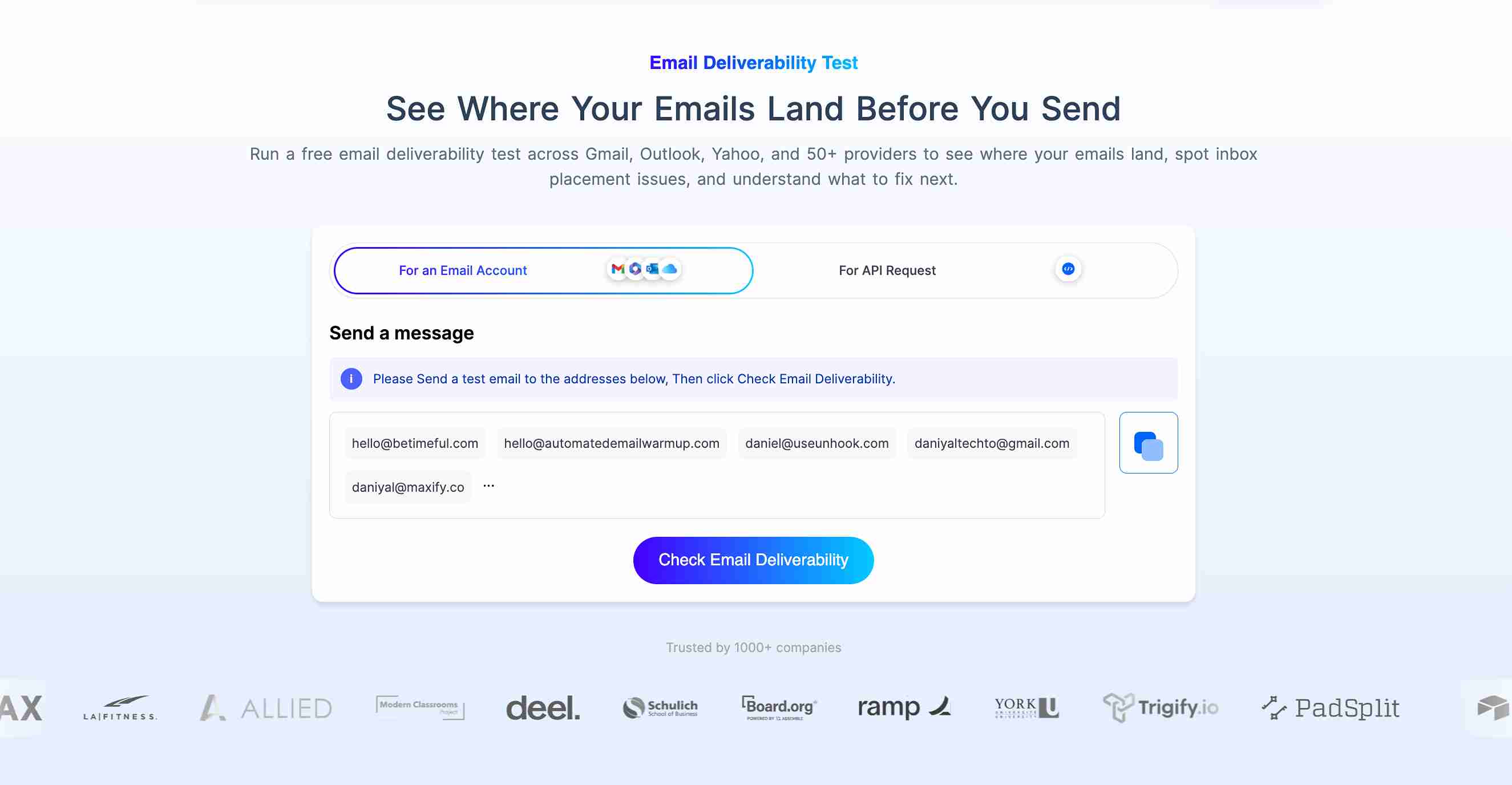
EmailWarmup.com’s email deliverability test offers:
- Unlimited inbox placement testing with no credit limits or subscription caps
- Reports showing inbox, promotions, spam, or undelivered status per provider
- Connection to a full deliverability audit, authentication tools, and unlimited expert consultation
- Placement results across Gmail, Outlook, Yahoo, Google Workspace, and 50+ mailbox providers
While MailGenius provides a score and a list of issues, EmailWarmup.com provides testing, diagnosis, and a guided fix — all in one platform.
Final verdict on MailGenius
MailGenius is a basic spam-testing tool with an attached consulting arm.
The diagnostics provide a useful pre-send checkpoint for small senders, and the consulting calls earn genuine praise from users who need hands-on guidance on authentication.
The limitations that keep it from a stronger recommendation:
- False blacklist results undermine diagnostic trust
- Limited test credits on lower plans restrict regular use
- Aggressive follow-up marketing frustrated multiple reviewers
- No ongoing monitoring, no fixing tools, no infrastructure value
For quick, occasional spam checks, MailGenius serves its purpose. For teams that need reliable testing at scale — with fixes attached — the platform falls short of what deliverability demands.
Frequently asked questions about MailGenius
Here are the most common questions buyers ask before choosing MailGenius.
MailGenius offers limited free testing, but regular use requires a paid plan starting at $8/month. The free tier provides enough credits for a single test, which is sufficient for a one-time diagnostic but inadequate for ongoing use.
No. MailGenius diagnoses problems through spam testing and authentication checks. Fixing the issues requires manual DNS changes, infrastructure adjustments, or shifts in engagement strategy. MailGenius offers paid consulting calls in which experts walk you through the fixes, but the platform itself does not implement the changes.
Accuracy is disputed. Multiple Trustpilot reviewers report false blacklist results — domains flagged as blacklisted that were confirmed clean through direct blacklist checks. MailGenius states that results are pulled directly from the blacklists, but the discrepancies suggest potential issues with how the data is queried or displayed.
Both tools provide spam score testing through a send-to-test-address workflow. Mail-Tester is free (with limited daily tests), while MailGenius charges for plans but adds consulting services. For quick, free diagnostics, Mail-Tester is simpler. For ongoing testing with expert support, MailGenius offers more — at a cost.



