




Mail-Tester is the simplest deliverability diagnostic you can run. Send an email to a generated test address, click a link, and receive a score out of 10 — covering authentication records, content quality, blacklist status, and spam filter signals. The whole process takes about two minutes, and basic testing is free.
For quick pre-send sanity checks, Mail-Tester fills a genuine gap. The tool catches misconfigured SPF, DKIM, and DMARC records, identifies broken links in email content, and flags obvious spam triggers. Multiple users across Trustpilot describe it as helpful for diagnosing DNS issues. One reviewer called it essential for anyone setting up a new mail server.
The limitations are equally clear. Trustpilot’s 3.5/5 rating across 11 reviews reveals consistency problems — one user reported getting scores of 6.5, 10, and 9.5 from three different locations for the same email. The free tier is now limited (the move from free to paid has frustrated users who relied on unlimited testing).
And a perfect 10/10 score does not guarantee inbox placement — a fact that surprised at least one Reddit user whose emails landed in junk despite a flawless Mail-Tester report.
This review covers:
- What Mail-Tester’s spam scoring measures
- How the free-to-paid transition affects usability
- Accuracy and reliability concerns from real users
- Where spam scoring fits (and fails) in a deliverability strategy
- A stronger alternative for teams that need real inbox placement data
TLDR: Mail-Tester at a glance
Here is a quick summary of what Mail-Tester does and where it fits in the deliverability landscape.
| Category | Detail |
| What it is | Lightweight spam testing tool with a simple send-and-score workflow |
| Best for | Quick authentication and content checks before sending |
| Deliverability impact | Diagnostic only — scores email quality but does not test actual inbox placement |
| Main limitation | Inconsistent scores across locations; free tier limited; no monitoring or fixing tools |
| Best-fit user | Developers and sysadmins setting up or troubleshooting mail servers |
| Best alternative | Email deliverability test for unlimited inbox placement testing across 50+ providers |
Does Mail-Tester’s free model still work in 2026?
Mail-Tester originally gained popularity as a free tool. The shift to a paid model has changed the equation (and frustrated long-time users who depended on unrestricted access).
The current free tier allows only a limited number of daily tests — enough for a one-off check but not for regular pre-send testing. Paid access is available, though the pricing structure is not prominently displayed.
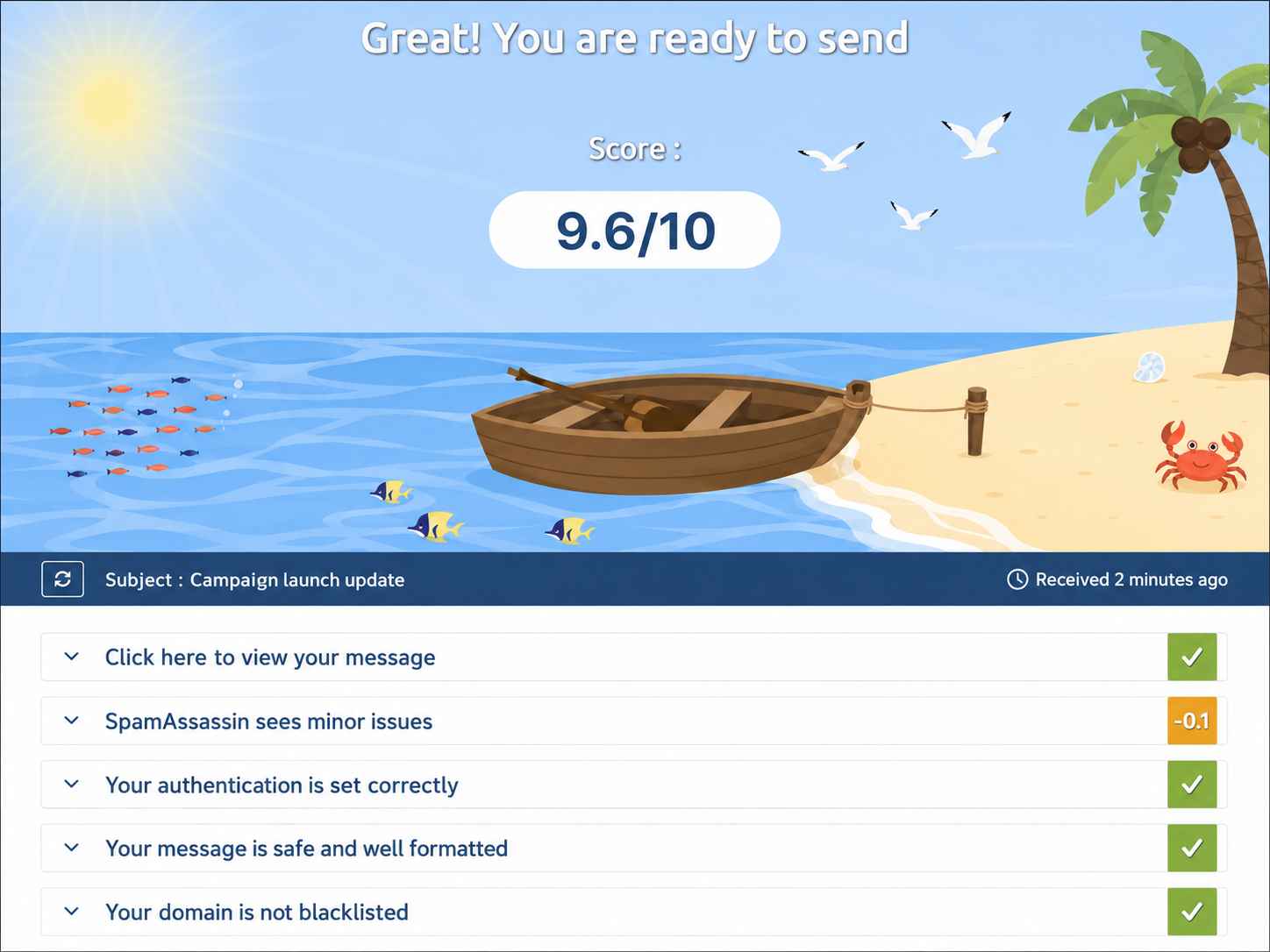
One Trustpilot reviewer noted that the product’s quality declined after the transition to a paid service, with more frequent crashes and slower loading times.
For a single diagnostic, the free tier still works. For teams that need regular testing (weekly newsletters, ongoing outbound campaigns), the limited free access forces a choice between paying for Mail-Tester and switching to a tool that offers greater testing volume and deeper diagnostics. The pricing comparison against alternatives is very important here.
EmailWarmup.com’s deliverability test is unlimited and free — with no credit limits and no subscription required. Mail-Tester’s paid model is harder to justify when free alternatives offer more comprehensive testing.
What Mail-Tester’s spam scoring tells you (and what it misses)
Mail-Tester’s scoring evaluates several factors that affect whether spam filters catch your email. Understanding what the score covers — and what it does not — is critical.
Authentication scoring
The tool checks SPF, DKIM, and DMARC configuration. Misconfigured or missing records are flagged with clear explanations.
For sysadmins setting up a new mail server, the authentication checks are the most valuable part of the report — catching a missing SPF include or an incorrect DKIM selector before production traffic starts.
Content analysis
Mail-Tester reviews email content against SpamAssassin rules, checking for phrases, formatting patterns, and structural issues that common spam filters flag. Broken links, excessive images, and missing unsubscribe headers all appear in the breakdown.
The score-to-placement gap
A perfect 10/10 score does not mean your email will reach the inbox. One Reddit user documented this problem clearly — a 10/10 Mail-Tester score, properly configured authentication, and every email still landing in Outlook’s junk folder. The root cause turned out to be domain age (less than 30 days), which Mail-Tester does not evaluate.
Spam scoring measures configuration correctness.
Inbox placement depends on sender reputation, engagement history, domain age, IP reputation, and provider-specific filtering — none of which Mail-Tester captures. The gap between a good score and actual inbox delivery is where most deliverability problems live.
Consistency issues
At least one Trustpilot reviewer reported wildly different scores from different locations — 6.5 in Paris, 10 in Bucharest, 9.5 in Manila — for the same email sent from the same infrastructure.
The reviewer concluded that the scores lacked consistency and reliability, and that decisions based on the tool led to unnecessary remediation spending.
Pros and cons of Mail-Tester
Mail-Tester is a useful, quick-check tool with genuine blind spots that limit its reliability for deliverability decisions.
- Simple send-and-score workflow requires zero setup
- Clear authentication reporting for SPF, DKIM, and DMARC
- SpamAssassin-based content analysis catches obvious triggers
- Useful for sysadmins verifying new mail server configurations
- Inconsistent scores reported across locations for the same email
- Free tier heavily limited after paid transition
- Does not test actual inbox placement — scores configuration, not delivery
- No reputation, engagement, or domain age evaluation
- No fixing tools, monitoring, or ongoing diagnostic capability
Who should and shouldn’t use Mail-Tester
Mail-Tester works as a first-pass diagnostic for technical users who understand its limitations. The tool breaks down when users mistake a good spam score for guaranteed inbox placement.
Who should use Mail-Tester
- Small senders running a one-time check before launching a new domain
- Developers and sysadmins validating DNS records on new or reconfigured mail servers
- Technical users who want a quick SpamAssassin-style content scan before a campaign
Who shouldn’t use Mail-Tester
- High-volume senders who need unlimited testing without daily credit limits
- Teams that need deliverability monitoring over time (not point-in-time snapshots)
- Marketers who need to know where emails actually land across Gmail, Outlook, and Yahoo
Anyone who needs the diagnostic connected to fixes — authentication setup, reputation repair, or warmup
Mail-Tester scorecard for deliverability-focused teams
Here is how Mail-Tester rates across the dimensions that matter to teams evaluating spam-testing tools.
| Category | Rating | Notes |
| Ease of use | ★★★★★ | The simplest spam test available — send, click, read |
| Authentication checks | ★★★★☆ | Clear SPF, DKIM, and DMARC reporting |
| Accuracy/consistency | ★★☆☆☆ | Scores vary by location; no guarantee of repeatability |
| Inbox placement testing | ★☆☆☆☆ | Does not test placement — scores configuration only |
| Ongoing monitoring | ★☆☆☆☆ | No continuous monitoring capability |
| Pricing value | ★★★☆☆ | Free tier is limited; paid value unclear |
How Mail-Tester fits into a pre-send workflow
Mail-Tester works as a quick gate before production sending. The tool catches configuration errors, but cannot tell you whether your emails will reach the inbox.
Configuration validation
Before launching a new domain or switching ESPs, a Mail-Tester check confirms that authentication records are published correctly.
The tool catches missing SPF mechanisms, broken DKIM selectors, and absent DMARC policies — all issues that are fixable in minutes once identified.
Content pre-screening
Running campaign content through Mail-Tester’s SpamAssassin analysis catches obvious spam triggers (excessive links, image-heavy layouts, spam-associated phrases). The content check is surface-level but useful for catching mistakes before they go live.
Where the workflow breaks
Mail-Tester cannot tell you whether Gmail, Outlook, or Yahoo will place your email in the inbox, promotions tab, or spam folder.
Actual placement depends on sender reputation, IP reputation, engagement history, and provider-specific algorithms — none of which Mail-Tester evaluates. A 10/10 score with a poor reputation still means spam-folder delivery.
What happens after you stop using Mail-Tester?
Nothing persists. Mail-Tester provides a single-use report tied to each test — no stored history, no dashboards, no exportable data.
Previous scores live in your browser history (or wherever you saved the results URL), but the platform retains no longitudinal view of your deliverability trajectory.
Stopping Mail-Tester has no operational impact, as the tool provides no lasting infrastructure value. The authentication fixes you made based on the reports remain in place, but the diagnostic capability is entirely removed.
A better alternative to Mail-Tester | EmailWarmup.com
Mail-Tester scores your email against spam filters. EmailWarmup.com shows you where your email actually lands — and then helps you fix the problems that put it there.
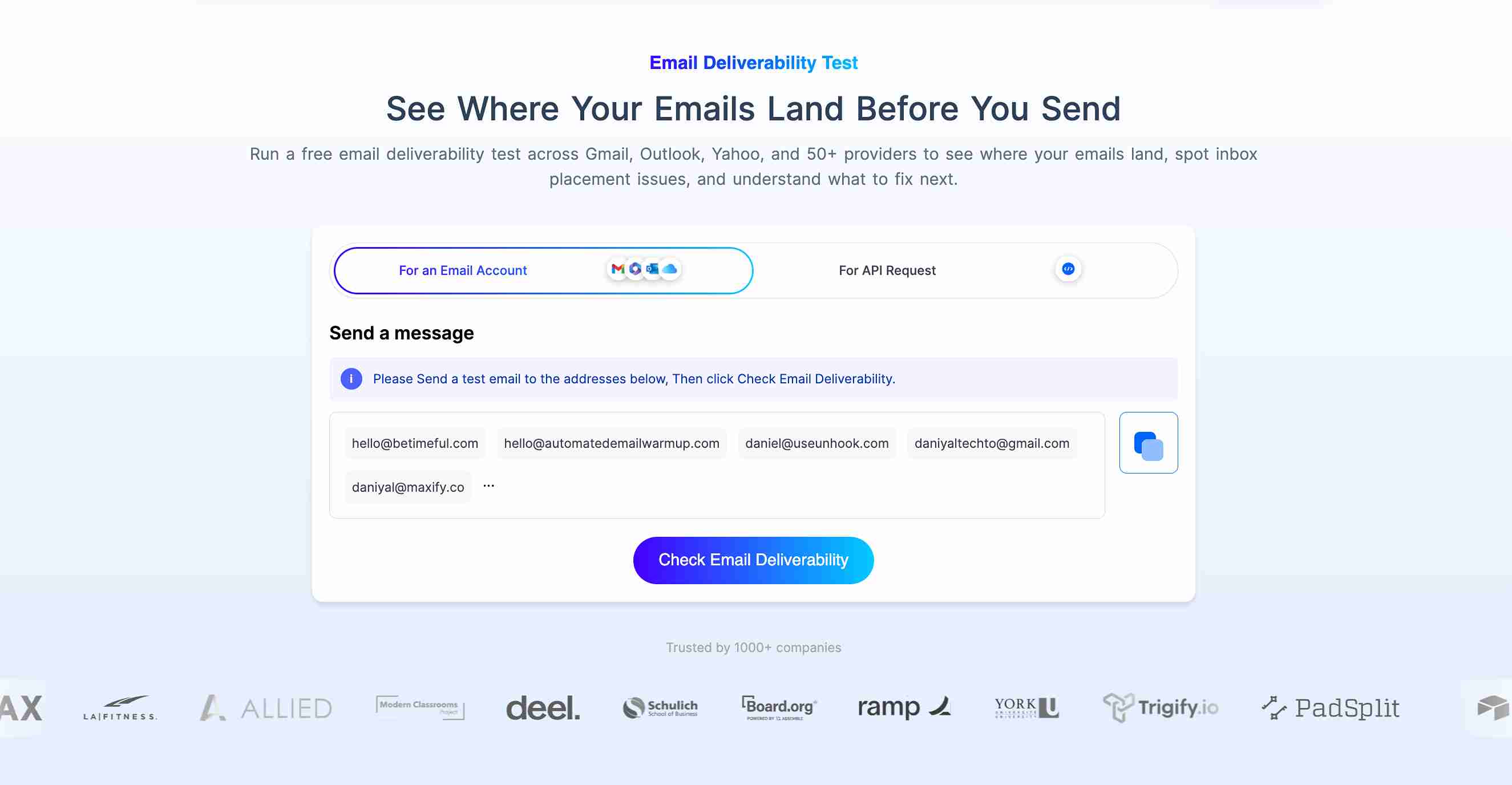
EmailWarmup.com’s email deliverability test provides:
- Unlimited testing with no credit limits or subscription fees
- Actionable next steps connected to a full deliverability audit and unlimited expert consultation
- Reports that distinguish between inbox, promotions, spam, and undelivered status per provider
- Real inbox placement results across Gmail, Outlook, Yahoo, Google Workspace, & 50+ providers
Mail-Tester tells you your SpamAssassin score is 10/10. EmailWarmup.com tells you Gmail is placing your email in promotions, Outlook is sending it to junk, and your domain reputation dropped because of a blacklisted IP — then provides the tools and guidance to fix each issue.
Final verdict on Mail-Tester
Mail-Tester earned its reputation as the quickest way to check authentication and content quality before sending. For sysadmins and developers validating new mail servers, the tool remains a handy first-pass diagnostic.
The limitations that cap its usefulness:
- Spam scores do not predict inbox placement
- No monitoring, no reputation data, no fixing capability
- Free access is now restricted, with unclear paid pricing
- Scoring inconsistencies across locations undermine reliability
For a two-minute configuration check, Mail-Tester still works. For anything beyond that — real placement data, ongoing monitoring, or deliverability that connects testing to remediation — the tool is a starting point that cannot carry the weight on its own.
Frequently asked questions about Mail-Tester
Here are the most common questions buyers ask when evaluating Mail-Tester.
Limited free testing is still available, though access has been restricted compared to earlier versions. The platform has moved toward a paid model. One Trustpilot reviewer noted the website initially advertises 100 free credits but actually provides 10. For regular testing, paid access is required.
No. A perfect score means your email passes SpamAssassin checks and has correct authentication records. Inbox placement depends on additional factors that Mail-Tester does not evaluate — sender reputation, domain age, IP history, engagement patterns, and provider-specific filtering. Multiple users have reported perfect scores with emails still landing in spam or junk folders.
Accuracy is inconsistent. At least one Trustpilot reviewer documented significantly different scores from different geographic locations for the same email. The authentication and content checks are generally reliable, but the composite spam score should not be treated as a definitive deliverability prediction.
Both tools provide spam score testing through a similar send-to-test workflow. Mail-Tester is simpler and partially free. MailGenius adds paid consulting services from deliverability experts. For quick, free configuration checks, Mail-Tester is the lighter option. For teams that want expert guidance alongside diagnostics, MailGenius offers more — at a higher price.



