


Inbox placement API
Add inbox placement testing to your stack in minutes
EmailWarmup's Inbox Placement API tests delivery across 50+ real mailboxes and returns structured results in seconds. Build placement checks into your platform, automate pre-send QA, or monitor deliverability at scale — all through a single REST endpoint.

Trusted by 1000+ companies
What you’re replacing with this API
Most inbox testing methods give you partial signals, delayed answers, or limited coverage — this API is built to replace all three.
| Old method | The problem |
|---|---|
 Manual seed lists Manual seed lists | Hard to maintain, limited to 3–5 providers, inconsistent results |
 Spam score tools Spam score tools | Predicts based on content rules — doesn't reflect actual inbox placement |
 Sending to real recipients Sending to real recipients | You find out too late, and damage has already been done to your reputation |
 Competitor APIs Competitor APIs | Limited providers, slow results, per-test pricing that adds up fast |
From API call to placement insight
The system is designed to be simple to integrate and to return results quickly.
Connect
Create an API key and start sending requests. The API uses standard REST conventions and returns clean JSON responses.
Test
Submit your email content. The system routes it through monitored seed mailboxes across Gmail, Outlook, Yahoo, Google Workspace, and a wide range of regional providers.
Receive results
Within seconds, you receive a complete placement breakdown. Each provider reports where the message landed, along with authentication status and delivery timing.
Act
Use the data immediately. When placement issues appear, resolve them before they affect real recipients. If needed, connect directly to warmup infrastructure to improve sender reputation over time.
Complete placement data, structured for your stack
Every test produces structured data designed for direct use in your systems. Results can be consumed immediately or delivered via webhooks into your internal systems, monitoring tools, or communication channels.

Placement by provider
Inbox, spam, promotions, updates, or blocked, reported at each mailbox tested

Gmail category detection
Precise tab placement across Primary, Promotions, Social, Updates, and Forums

Authentication results
SPF, DKIM, and DMARC are evaluated from the receiver’s perspective

Delivery timing
Time-to-inbox across providers is useful for identifying reputation or throttling issues

Aggregate metrics
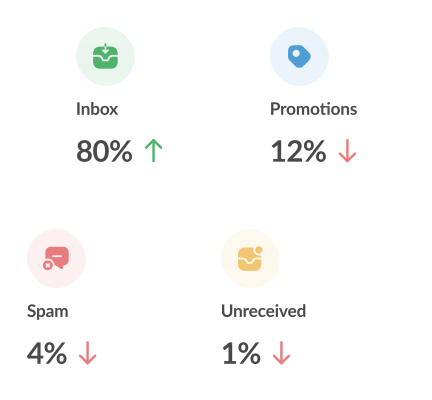
Inbox rate, spam rate, and promotions rate across the full test set
Tested where your audience actually is
Deliverability cannot be judged from a single provider. Real audiences are distributed across platforms, regions, and infrastructures.
| Provider | Coverage | Approximate reach |
|---|---|---|
 Gmail / Google Workspace Gmail / Google Workspace | Personal + business accounts | 1.8B+ users globally |
 Outlook / Microsoft 365 Outlook / Microsoft 365 | Consumer + enterprise mailboxes | 400M+ users |
 Yahoo Mail / AOL Yahoo Mail / AOL | Legacy + active consumer accounts | 225M+ users |
 Apple Mail / iCloud Apple Mail / iCloud | iOS and macOS native clients | 150M+ users |
 ProtonMail / FastMail ProtonMail / FastMail | Privacy-focused providers | 100M+ combined |
 GMX GMX | Germany and European markets | 40M+ users in Germany/Europe |
 Mail.ru Mail.ru | Russia and Eastern Europe | 100M+ users in Russia/Eastern Europe |
 QQ Mail QQ Mail | China | 900M+ users in China |
 40+ others 40+ others | Local ISPs, telecom mail, and enterprise systems | Varies by region |
Built for teams that can’t compromise on deliverability
Built for teams and individuals who rely on outbound email and can’t afford low deliverability, spam flags, or damaged sender reputation.

SaaS platforms and ESPs
Build deliverability testing into your product. White-label the API for client-facing reports without building seed list infrastructure yourself.

Marketing operations teams
Run pre-send checks before campaigns go live. Test subject line variations, content changes, and sender configurations as part of your approval workflow.

Developers and DevOps
Integrate placement checks into CI/CD pipelines. Fail builds when email templates trigger spam filters. Monitor transactional email health alongside your other observability tooling.

Agencies
Test across client domains with a single integration. Catch deliverability regressions before clients see declining engagement.

What makes this inbox
placement API #1
Your inbox placement shouldn’t rely on guesswork. This API builds real sender reputation through automated, human-like engagement—so your emails consistently land where they matter most: the inbox, not spam.
Real inbox placement
Each test is sent to actual mailboxes and reports the observed outcomes — this is not a model or a score. It is a direct measurement of your placement.

Unlimited testing
There are no artificial limits or per-test charges. You can test every variation, every time.

Global coverage
The network spans major providers and regional systems across multiple markets. Testing reflects the actual distribution, not a narrow sample.

complete deliverability system
Placement data shows you the problem. Warmup infrastructure helps resolve it. Validation tools reduce risk before sending — each component operates within a single platform.

Built for production use
The API is designed to handle real workloads and sensitive data responsibly.
- Customer data is logically isolated across accounts
- All communication is encrypted using modern transport standards
- Infrastructure follows established security and compliance practices
- Email content is processed only for the duration of the test and not retained
Frequently asked questions
about Inbox placement API
Here’s everything you need to know about Inbox placement API:
 Start Programmatically
 Run a Free Test