



Gmail and Yahoo now reject emails from bulk senders who fail authentication, exceed spam thresholds, or lack one-click unsubscribe. If you send 5,000+ emails per day to personal Gmail or Yahoo addresses, these rules apply to you — and non-compliance means your messages won’t arrive.
The requirements took effect in February 2024. Google escalated enforcement in November 2025, moving from temporary delays to permanent rejections. Microsoft followed with similar rules for Outlook, Hotmail, and Live.com addresses in May 2025.
The three core requirements are straightforward:
- Keep spam complaint rates below 0.3%
- Authenticate emails with SPF, DKIM, and DMARC
- Include one-click unsubscribe in promotional emails
Let’s break down exactly what each requirement means, what happens when you fail, and how to verify your compliance.
What counts as a bulk sender?
Google and Yahoo define bulk senders as anyone sending 5,000 or more emails per day to personal accounts.
The count includes all messages from your primary domain (subdomains roll up to the parent), and the threshold applies specifically to consumer inboxes — addresses ending in @gmail.com, @googlemail.com, or Yahoo-hosted domains.
Messages sent between Google Workspace accounts within the same organization don’t count toward this limit. But if you’re emailing personal Gmail addresses from your business domain, you’re subject to the rules regardless of your own email provider.
The enforcement timeline
The rollout happened in stages, with each phase tightening the screws on non-compliant senders.
| Date | What happened |
| October 2023 | Google and Yahoo announced requirements |
| February 2024 | Initial enforcement began (temporary errors) |
| June 2024 | One-click unsubscribe deadline |
| May 2025 | Microsoft began rejecting non-compliant emails |
| November 2025 | Gmail escalated to permanent rejections |
New domains face accelerated enforcement. If your domain hasn’t sent bulk email before January 2024, expect stricter scrutiny from day one.
What does email authentication require?
Authentication proves your emails actually come from you — not someone spoofing your domain. Gmail and Yahoo require three protocols working together, and your domain must pass DMARC alignment for messages to reach inboxes.
SPF records
SPF (Sender Policy Framework) lists the servers that are authorized to send email on your domain’s behalf. When a receiving server gets your message, it checks whether the sending IP appears in your SPF record. Missing or misconfigured SPF causes authentication failures.
DKIM signatures
DKIM (DomainKeys Identified Mail) adds a cryptographic signature to outgoing messages. The receiving server verifies this signature against a public key in your DNS records. A valid signature confirms the message wasn’t altered in transit.
DMARC policy
DMARC ties SPF and DKIM together by specifying what happens when authentication fails. For bulk senders, Gmail requires at minimum a p=none policy — meaning you’re monitoring failures without taking action yet. The critical piece is alignment: the domain in your From: header must match either your SPF domain or DKIM signing domain.
You need both SPF and DKIM configured, but only one needs to align with your From: domain for DMARC to pass. Most deliverability experts recommend aligning both as a safety net.
What is the spam rate threshold?
Gmail enforces a hard ceiling — your spam complaint rate must stay below 0.3%. Yahoo follows the same threshold. Google recommends staying below 0.1% for reliable inbox placement — the 0.3% threshold is when enforcement begins, not a safe target.
Spam rate measures how often recipients mark your emails as spam (the “Report spam” button) relative to total emails delivered. Even a small number of complaints can push you over the threshold if your sending volume is low. A sender delivering 10,000 emails needs only 30 spam reports to hit 0.3%.
The context for these thresholds matters. According to spam email statistics, roughly 46-47% of all email traffic is spam — around 176 billion junk messages daily. Gmail blocks over 15 billion spam emails every day. The new requirements shift responsibility to senders — if recipients don’t want your email, ISPs won’t deliver it.
What is one-click unsubscribe?
Gmail and Yahoo require promotional emails to include a machine-readable unsubscribe mechanism that works with a single click.
Burying an unsubscribe link in tiny footer text doesn’t satisfy this requirement — the standard demands specific email headers that mail clients can act on automatically.
The technical implementation
One-click unsubscribe follows RFC 8058, which defines two required headers:
- List-Unsubscribe: <https://example.com/unsubscribe?id=abc123>
- List-Unsubscribe-Post: List-Unsubscribe=One-Click
When Gmail detects these headers, it displays an “Unsubscribe” link near the sender’s name. Clicking it triggers an automatic HTTP POST request to your server — no landing page, no confirmation form, no second click required from the user’s perspective.
You still need a visible unsubscribe link in your email body (that’s a CAN-SPAM requirement), but the body link can go to a preference center. The header-based one-click option must be immediate.
Processing window
Unsubscribe requests must be honored within 48 hours. If someone clicks unsubscribe on Monday, they shouldn’t receive another email from that list by Wednesday. Failing to process requests quickly damages your sender reputation and can trigger enforcement.
Exemptions from one-click subscribe
Transactional emails — password resets, shipping confirmations, account alerts — don’t require one-click unsubscribe. The rule applies only to promotional and marketing messages. Gmail and Yahoo distinguish between these categories based on content analysis and recipient behavior, not sender intent.
What happens if you don’t comply?
Non-compliant emails don’t simply land in spam.
Starting November 2025, Gmail actively rejects messages that fail authentication or come from senders with high spam rates. Microsoft takes an even harder line — non-compliant bulk mail gets bounced immediately with error code 550 5.7.515.
Gmail’s enforcement progression
Gmail started gently — temporary 4xx errors that delayed delivery but allowed retries. The November 2025 update changed the game. Messages now receive permanent 5xx rejections, meaning the email bounces back to your server with no option for retry.
The error codes tell you what went wrong:
| Error code | Meaning |
| 421 | Temporary failure (rate limiting, try later) |
| 550 5.7.1 | Authentication failed |
| 550 5.7.26 | DMARC alignment failure |
| 550 5.7.350 | Spam policy violation |
Microsoft’s approach
Microsoft skipped the gradual phase entirely. As of May 5, 2025, emails from high-volume senders that lack proper authentication get rejected outright — not filtered to junk, but bounced. The error message explicitly states that the domain doesn’t meet the required authentication levels.
According to Microsoft’s 2025 mandate, non-compliant messages trigger error 550 5.7.515, which reads “Access denied, sending domain does not meet the required authentication level.”
Long-term reputation damage
Getting blocked isn’t just a one-time delivery failure.
Repeated rejections and spam complaints accumulate into lasting reputation damage. Recovering a damaged sending domain takes weeks or months of careful warmup and clean sending practices — far longer than getting compliant would have taken upfront.
How can you check your email compliance?
Verifying compliance before problems arise saves you from learning about issues through bounced emails and angry sales teams. Gmail provides free monitoring tools, and testing services can validate your authentication setup in minutes.
Google Postmaster Tools
Postmaster Tools shows your domain’s spam rate, authentication status, delivery errors, and reputation score as seen by Gmail. Setup takes about five minutes: verify domain ownership, and Google starts collecting data immediately.
The dashboard breaks down performance by IP and domain, making it easy to identify which infrastructure is causing issues. If you’re using multiple ESPs or sending from different subdomains, this granularity matters.
Run a deliverability test
Authentication records are easy to misconfigure — a typo in your SPF record or missing DKIM rotation can cause failures you won’t notice until emails start bouncing. Running a test catches these issues before they affect real campaigns.
Our free email deliverability test validates your SPF, DKIM, and DMARC configuration across 50+ mailbox providers. It shows exactly where emails land (inbox, spam, or blocked) and flags authentication problems.
Manual DNS checks
For quick verification, send an email to your own Gmail account and click “Show original” in the message options. Gmail displays authentication results at the top: SPF, DKIM, and DMARC should all show “PASS” with aligned domains.
If any check shows “FAIL” or “SOFTFAIL,” your DNS records need attention. DKIM failures are particularly common after ESP migrations or DNS changes.
Using an email spam checker
You can use EmailWarmup.com’s email spam checker to dive more into what percentage of your actual emails are going to spam — across both Google and Outlook.
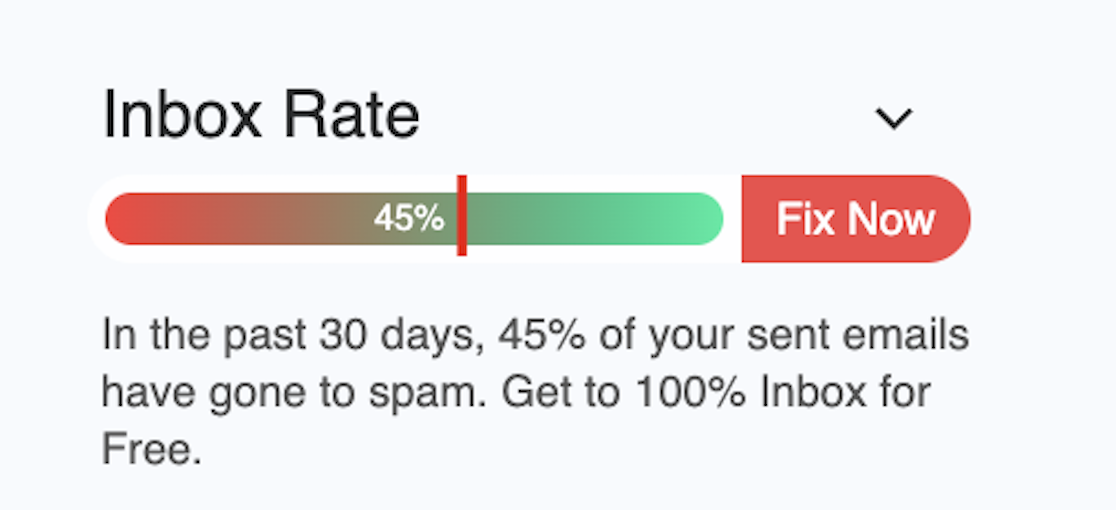
Free Email Spam Checker Extension
See exactly where your emails land (inbox, promotions, or spam) without leaving Gmail or Outlook. Get a real-time deliverability score in your compose section, and clear placement labels in your Sent folder for emails you’ve already sent. Free of cost!
Real-time deliverability score
Percentage score appears beside your compose window before you hit send.
Inbox vs. spam visibility
Instant view of what percent reached inbox vs. spam across providers.
Sent-folder placement labels
Every sent email is tagged as inbox, promotions, or spam so you actually know where your emails landed.
Unlimited & free
While other tools charge $25–$85/mo, our extension is free forever.
Who needs to pay the closest attention?
The requirements apply to everyone sending 5,000+ emails daily, but some senders face a higher risk than others. Cold emailers, marketing teams, and anyone recovering from past email deliverability problems should treat compliance as urgent.
Cold email senders
Cold outreach triggers more spam complaints than any other email category (recipients didn’t ask for your message, after all).
The 0.3% threshold feels generous until you realize cold campaigns routinely see complaint rates of 0.5-1% without careful email list hygiene and targeting.
Building sender reputation through email warmup before launching campaigns is no longer optional — it’s survival.
Marketing email senders
Newsletter and promotional senders face the one-click unsubscribe requirement.
If your email platform doesn’t automatically add RFC 8058 headers, you need to configure them manually or switch providers.
Most major ESPs (Mailchimp, Klaviyo, SendGrid) now include compliant headers by default, but older systems may not.
Small senders approaching the threshold
If you’re sending 4,000 emails today, you’re one growth spike away from bulk sender status.
Even if you’re under the threshold, following these requirements protects you from future enforcement and improves deliverability now. ISPs reward authenticated, wanted email regardless of volume.
How EmailWarmup.com helps you stay compliant
Meeting sender requirements is one thing, but maintaining the email reputation needed to actually reach inboxes is another.
EmailWarmup.com addresses both sides: verification tools to verify compliance and warmup services to build the engagement signals ISPs want to see.
For complex authentication issues — SPF flattening, DMARC policy upgrades, or diagnosing intermittent failures — our email deliverability consultants handle the technical work.
Frequently asked questions
Here are some frequently asked questions about Gmail and Yahoo bulk sender requirements:
No. Messages sent between Google Workspace users within the same organization are exempt. The requirements apply only to emails sent to personal Gmail and Yahoo addresses (@gmail.com, @googlemail.com, Yahoo-hosted domains).
Google Postmaster Tools displays your spam rate as reported by Gmail users. Anything above 0.1% deserves attention. Above 0.3% means you’re already in enforcement territory and should expect delivery problems.
No. Password resets, order confirmations, shipping notifications, and similar transactional messages are exempt. The requirement covers promotional and marketing content only.
Gmail and Microsoft reject them outright. You’ll receive a bounce message with an error code indicating the failure type. The email never reaches the recipient’s inbox or spam folder.
Yes. Gmail requires SPF, DKIM, and DMARC configured for bulk senders. You need both SPF and DKIM set up, though only one must align with your From: domain for DMARC to pass.
Your ESP handles DKIM signing and typically provides SPF records for its sending IPs. You’re responsible for adding their records to your DNS and setting up DMARC on your domain. Most ESPs have setup guides for this.
Yes. Gmail, Yahoo, and Microsoft have stated these are ongoing standards. Expect enforcement to tighten over time, not relax. Building compliant infrastructure now protects you from future rule changes.
Within 48 hours. Someone who unsubscribes on Monday should not receive another promotional email from that list by Wednesday at the latest.



