



Mixmax occupies a lane that most enterprise engagement platforms ignore — it lives entirely inside Gmail (and now Outlook), turning your inbox into a full sales engagement layer.
There’s no separate app to log into, a second dashboard to learn, and no context-switching between CRM and outreach. Reps open Gmail, and the sequences, tracking, templates, and AI assistance are already there.
That simplicity is what’s earned Mixmax a 4.6/5 on G2 across 1,400+ reviews and a loyal user base of AEs, CSMs, founders, and recruiters who describe it as “the super fuel behind your Gmail.”
The pricing is transparent ($29-$89/user/month), the setup is fast (most teams are productive in week one), and the email tracking is genuinely best-in-class for knowing exactly when prospects engage.
But there’s a ceiling. Mixmax works within Gmail’s infrastructure — which means Gmail’s sending limits, spam filtering, and deliverability constraints are your constraints too.
Multiple G2 reviewers report emails landing in spam when using Mixmax at volume.
There’s no native mobile app. And for teams that need multi-channel engagement (phone, LinkedIn, SMS alongside email), Mixmax only recently added those capabilities on the Custom plan (which requires a sales call to price).
This review covers:
- Transparent pricing across Inbox Copilot, Meeting Copilot, and Engagement tiers
- Sequence quality, email tracking, and daily SDR experience inside Gmail
- Where the Gmail-native architecture helps and where it limits
- What the platform leaves unaddressed in deliverability
- Who fits the platform and who’s outgrown it
TLDR: Mixmax at a glance
Here’s an overview of Mixmax:
| Category | Detail |
| What it is | Gmail-native sales engagement platform for sequences, email tracking, scheduling, templates, and AI copilots |
| Best for | Small-to-mid teams (5-50 reps) who work primarily in Gmail |
| Deliverability tooling | None native — no warmup, no inbox rotation, no mailbox health monitoring |
| Main limitation | Scales within Gmail’s sending constraints; multi-channel and dialer are Custom-plan only |
| Best-fit user | AEs, CSMs, founders, and small SDR teams who want engagement without leaving Gmail |
How much does Mixmax cost in 2026?
Mixmax is one of the few engagement platforms that publishes pricing transparently. The new 2026 structure splits into AI copilots (modular) and a bundle — no hidden costs, no sales call required on standard plans.
| Plan | Monthly per user (annual) | What it includes |
| Inbox Copilot | $29 | Email tracking, templates, reminders, AI inbox assistant, Smart Send |
| Meeting Copilot | $29 | Meeting prep, auto-notes, summaries, CRM sync of meeting outcomes |
| Engagement Copilot | $49 | Multi-step sequences, AI-personalized messaging, reply detection, shared templates |
| Mixmax Bundle (all 3) | $89 | All copilots, Salesforce + HubSpot CRM sync, full engagement suite |
| Custom (Enterprise) | Contact sales | Adds dialer, SMS, LinkedIn Sales Navigator, advanced rules, delegated sending |
The $89/user/month bundle is the plan most sales teams will land on — it includes CRM sync (Salesforce and HubSpot), sequences, AI, and the full copilot stack.
At that price for 10 reps, Mixmax costs $10,680/year. Compare that to Salesloft at $42,000-$55,000/year or Outreach at $28,000-$35,000/year for the same team size. The value per dollar is significantly better for teams that don’t need enterprise-grade engagement depth.
The catch is what’s not on the self-serve plans. The dialer, SMS, LinkedIn Sales Navigator integration, and multichannel sequences all sit on the Custom plan (which requires contacting sales).
For teams that need phone alongside email, the real cost is higher — and unknown until you talk to Mixmax’s sales team.
What does Mixmax reveal in daily Gmail-based selling?
Mixmax’s strength is that it doesn’t ask reps to change how they work. Everything happens inside the inbox they already have open all day. Here’s what the core capabilities deliver.
Email tracking
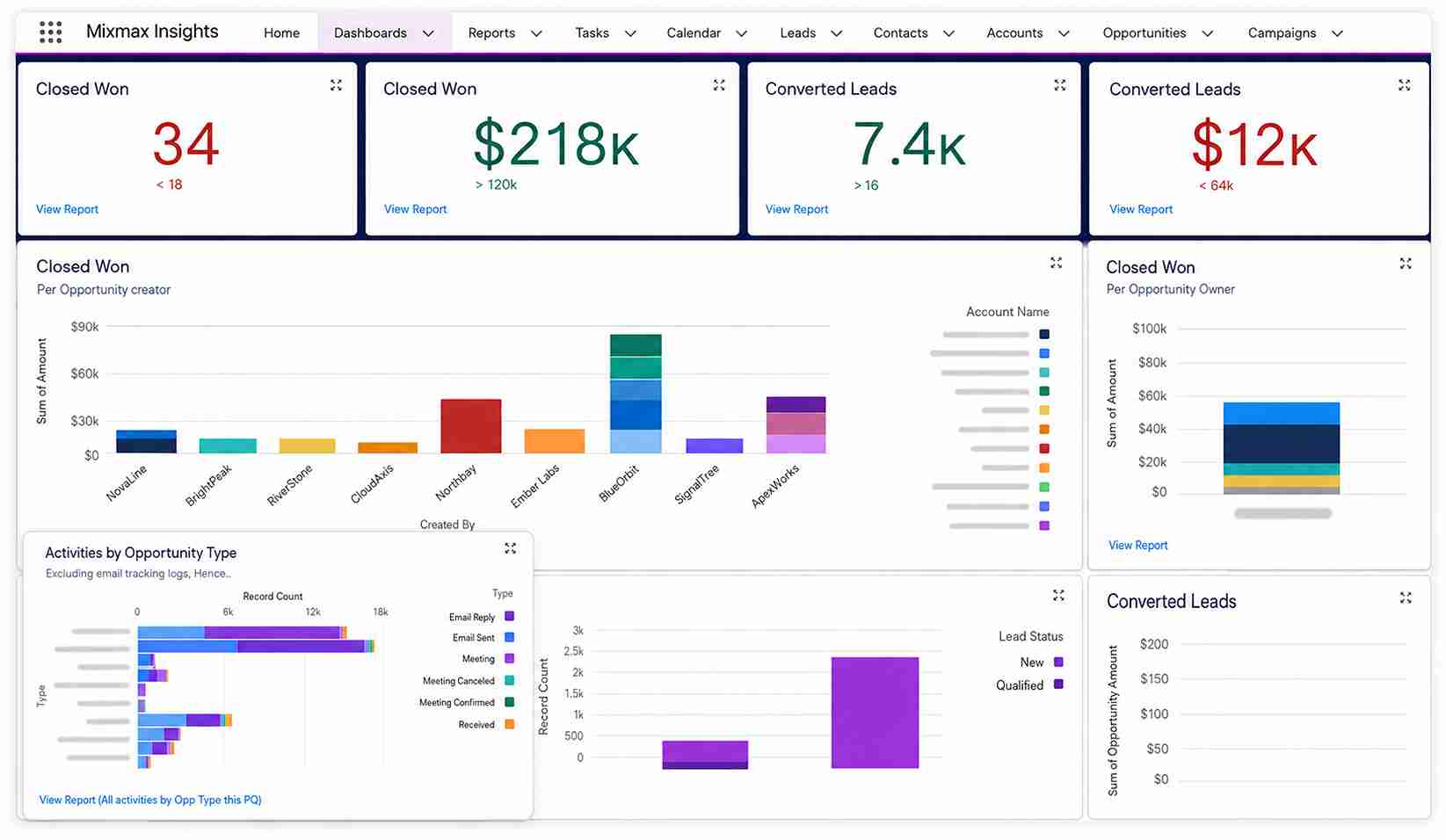
The email tracking (opens, clicks, attachment views) is the most consistently praised feature across 1,400+ G2 reviews. Reps see who opened, when, how many times, and whether they clicked any links — in real time.
The “opened 3 times” alert is a standout detail that multiple reviewers call out for perfectly timing follow-ups. Smart Send (AI-optimized send times per recipient) is included on all paid plans and boosts open rates without any manual effort.
Sequences
The sequence builder is clean and intuitive — multi-step email follow-ups with personalization merge fields, automatic reply detection (stops the sequence when someone responds), and shared templates that enforce consistent messaging across the team.
The depth is moderate compared to Outreach or Salesloft (less branching logic, fewer conditional triggers), but for email-first outbound, it handles the job without complexity.
AI copilots (Cortex)
The three copilots — Inbox, Meeting, and Engagement — are backed by Cortex, Mixmax’s AI engine. The Inbox Copilot surfaces which accounts need attention and drafts context-aware replies. The Meeting Copilot auto-captures notes, generates summaries, and syncs to the CRM.
The Engagement Copilot builds sequences with AI-personalized messaging. The AI isn’t as deep as HubSpot’s Breeze or Gong’s CI integration, but for Gmail-native teams, having it embedded in the inbox (rather than in a separate app) is genuinely convenient.
Deliverability concerns
Multiple G2 reviewers report emails ending up in spam when using Mixmax for outreach — specifically flagging that the tracking pixel triggers some security systems.
One reviewer noted that “despite being genuinely professional” emails still get filtered. Mixmax doesn’t include warmup, inbox rotation, or inbox health monitoring, and since it operates within Gmail’s infrastructure, you inherit Gmail’s sending limits (~2,000/day for Workspace) and spam filtering behavior.
For low-to-moderate volume outreach (20-50 emails/day), this is usually fine. At high volume, it becomes a real risk.
What are the pros and cons of Mixmax?
Mixmax trades enterprise-grade depth for Gmail-native simplicity and transparent pricing. For teams that live in their inbox and send moderate-volume outreach, that tradeoff works well. For teams that need multi-channel execution at scale, the platform hits its ceiling.
Who should and shouldn’t use Mixmax?
Mixmax fits teams that want engagement layered onto Gmail — not teams that need a separate engagement platform. The dividing line is volume, channel mix, and how much infrastructure control you need.
Who should use it
- Small-to-mid sales teams (5-50 reps) that work primarily in Gmail
- AEs and CSMs who need email tracking, follow-up reminders, and CRM sync
- Founders and solopreneurs doing targeted outreach (not high-volume cold email)
- Teams that want transparent pricing and fast setup without enterprise overhead
Who shouldn’t use it
- High-volume cold email teams sending 100+ emails per rep per day
- Organizations that need phone, LinkedIn, and SMS alongside email in one platform
- Teams that require advanced deliverability management (warmup, inbox rotation)
- Enterprise orgs needing deep reporting, forecasting, or conversation intelligence
How does Mixmax compare to the alternatives?
Mixmax competes on simplicity and price — not on depth. The comparison works differently depending on whether you’re comparing against enterprise tools or other lightweight platforms.
Mixmax scorecard for Gmail-based sales teams
| Category | Rating | Notes |
| Sequencing depth | ★★★☆☆ | Clean email sequences, moderate branching, no multi-channel on standard plans |
| Deliverability management | ★☆☆☆☆ | No warmup, no inbox rotation — tracking pixel flagged by some filters |
| CRM integration | ★★★★☆ | Salesforce and HubSpot sync on Bundle ($89/mo), 12 verified integrations |
| Reporting quality | ★★★☆☆ | Good email engagement analytics, limited pipeline and team reporting |
| Ease of use | ★★★★★ | Lives inside Gmail — minimal learning curve, productive in week one |
| Pricing fit | ★★★★★ | Transparent, published, accessible ($29-$89/user/month) |
| EmailWarmup.com fit | ★★★★★ | High — no deliverability tools, and tracking pixel adds deliverability risk |
How does Mixmax fit into a Gmail-first outbound workflow?
Mixmax is designed to sit inside Gmail, not beside it. Every interaction starts and ends in the inbox.
Setup and onboarding
Setup takes minutes — install the Chrome extension (or Outlook add-in), connect your email, and you’re tracking, templating, and sequencing within the hour. CRM sync (Salesforce or HubSpot) on the Bundle plan requires basic configuration but no admin expertise.
Most teams are productive by day two. Mixmax has no mandatory onboarding fee and no annual commitment on self-serve plans. The contrast with Outreach ($5K-$15K onboarding) and Salesloft ($5K-$25K onboarding) is stark.
Integration depth
Salesforce and HubSpot integrations sync activities bidirectionally. Gmail and Google Workspace are the native environment. LinkedIn Sales Navigator, Slack, Zapier, and RB2B integrations are available.
The integration count (12 verified) is significantly smaller than HubSpot (1,700+) or Outreach (28) — but for Gmail-first teams, the key integrations are covered. Outlook support was added more recently and is less mature than the Gmail experience.
Sending limits and scaling
Mixmax operates within Gmail’s sending infrastructure — Google Workspace caps at ~2,000 emails/day for business accounts. The platform doesn’t include warmup, inbox rotation, or automated mailbox replacement.
The tracking pixel adds a delivery risk that several reviewers have flagged. For teams sending 20-50 emails per day per rep, the infrastructure is sufficient. Past 50+ daily emails per rep, a dedicated deliverability layer becomes necessary.
What happens after you stop using Mixmax?
CRM data logged to Salesforce or HubSpot persists.
Email tracking history stays inside Mixmax and doesn’t export natively. Sequence templates are lost. The Gmail inbox itself is unaffected — Mixmax is a layer on top, not a migration of your email infrastructure.
Some Trustpilot reviewers describe subscription cancellation as difficult — including unexpected charges after attempting to cancel. Read the billing terms and confirm cancellation in writing.
What Mixmax can’t protect — and what the tracking pixel makes worse
Mixmax sends through your Gmail account. The platform doesn’t monitor whether emails arrive, doesn’t warm up new domains, doesn’t rotate mailboxes based on health, and doesn’t detect when reputation degrades.
The tracking pixel (which enables the open and click tracking that users love) actively increases the risk of spam filtering — multiple reviewers confirm their emails get flagged as “malicious” by recipient security systems because of it.
The irony is real. The feature that makes Mixmax most valuable (tracking) is also the feature that can hurt deliverability. At moderate volume, the risk is manageable. At scale, it compounds.
EmailWarmup.com fills that gap:
- Free SPF, DKIM, DMARC, and domain reputation diagnostic tools
- Continuous mailbox health monitoring across all connected accounts
- Personalized warmup matched to each domain’s actual sending behavior
- Automatic detection and replacement of underperforming sending domains
- Soft bounce LinkedIn fallback — emails that fail silently trigger a LinkedIn message
The consultation is free, no subscription required. If your team uses Mixmax for outreach and has noticed emails landing in spam (or simply hasn’t checked), talk to a deliverability specialist before scaling further. The tracking pixel makes the infrastructure gap wider here than with platforms that don’t inject tracking elements.
Final verdict on Mixmax
Mixmax is the best Gmail-native engagement platform for teams that want simplicity, transparency, and fast time-to-value. The email tracking is genuinely best-in-class. The pricing is the most transparent in the category. And the setup-to-productive timeline (often day one) is unmatched.
- No mobile app limits on-the-go access to sequences and tracking
- Gmail-native UX means zero learning curve for reps already in their inbox
- Email tracking (opens, clicks, multi-open alerts) is the strongest in the category
- Multi-channel capabilities (dialer, SMS, LinkedIn) are locked behind the Custom plan
- Tracking pixel increases spam risk — a real tradeoff for the tracking quality
- Pricing is transparent and accessible ($29-$89/user/month, published)
For email-first teams that work in Gmail and send moderate volumes, Mixmax delivers exceptional value per dollar. For teams that need phone, LinkedIn, SMS, high-volume cold outbound, or advanced deliverability management, the platform hits its ceiling — and a dedicated engagement tool with a separate deliverability layer becomes necessary.
Frequently asked questions about Mixmax
Here are the most common questions buyers ask before choosing Mixmax.
Mixmax starts with a Free plan and a 14-day trial. Paid annual pricing is $29/user/month for Inbox Copilot, $29/user/month for Meeting Copilot, $49/user/month for Engagement Copilot, and $89/user/month for Mixmax Suite, which bundles all three copilots with Mixmax Core and Intelligence. Monthly billing is higher. Teams with five or more users can add enterprise features such as dialer, custom branding, custom domains, Salesforce Insights, and advanced workflow rules through sales.
Yes. Mixmax now has a dedicated Outlook integration, so it is no longer accurate to describe it as Gmail-only. The Outlook page says users can access the Mixmax sidebar, insert templates, update Salesforce records, track email activity, build multichannel sequences, and receive real-time engagement alerts from the inbox. Gmail is still the product’s older and more widely discussed environment, especially in reviews and comparison content, but Outlook is now officially supported.
Mixmax does not automatically damage deliverability, but its tracking features can add risk in stricter inbox environments. Mixmax’s own help center says Gmail may show a “Suspicious link” warning on cloud-hosted or tracked attachments, and that tracked links can also be affected to a lesser degree. For normal sales use, this is usually manageable. For high-volume cold outreach or enterprise security recipients, turn off open, click, or download tracking when inbox placement matters more than engagement reporting.
Mixmax can be better for smaller revenue teams, Gmail or Outlook-first sellers, and teams that want sequencing, tracking, scheduling, Salesforce sync, and workflow automation without heavy admin work. Outreach is usually stronger for large enterprise SDR teams that need a deeper standalone sales engagement system, mature governance, forecasting, analytics, and complex multi-role workflows. Mixmax itself positions the difference around ease of setup, lower cost, inbox-native work, and stronger adoption among AEs and customer-facing teams.
Mixmax does not appear to offer a native iOS or Android app for its sales engagement platform. Its product pages focus on working inside Gmail, Outlook, Salesforce, and the browser-based Mixmax experience, while third-party reviews commonly list the lack of a dedicated mobile app as a limitation. In practical terms, Mixmax is best treated as a desktop inbox and browser tool. Mobile users may still access email itself, but not a full native Mixmax mobile workspace.



