



The Barracuda Reputation Block List (BRBL) — also known as the Barracuda blacklist or simply BRBL — is a real-time DNS-based blocklist maintained by Barracuda Networks that flags IP addresses associated with spam, malware, or misconfigured mail servers.
Getting listed stops your emails from reaching recipients on enterprise mail servers that run Barracuda security appliances. Removal requires a manual delisting request, but only after the root cause is fixed — submitting before that almost always results in immediate relisting.
This guide covers the full removal process, what typically gets senders listed, how long delisting takes, and what to do afterwards to stay off.
In this guide, you’ll learn:
- Expected timelines for first-time and repeat offenders
- How to prepare for and submit a removal request
- What triggers a Barracuda blacklist listing
- When to involve a deliverability specialist
- Prevention strategies to stop relisting
Quick skim — Barracuda blacklist overview
The cards below capture everything you need to know before taking action.
Barracuda BRBL — key facts
What is the Barracuda blacklist, and who does it affect?
The BRBL operates at the IP address level, not the domain level. When a receiving server queries a listed IP, the DNS returns a 127.0.0.2 A record; clean IPs return NXDOMAIN (no record found). The database updates continuously through automated behavioral tracking and manual verification by Barracuda Central researchers.
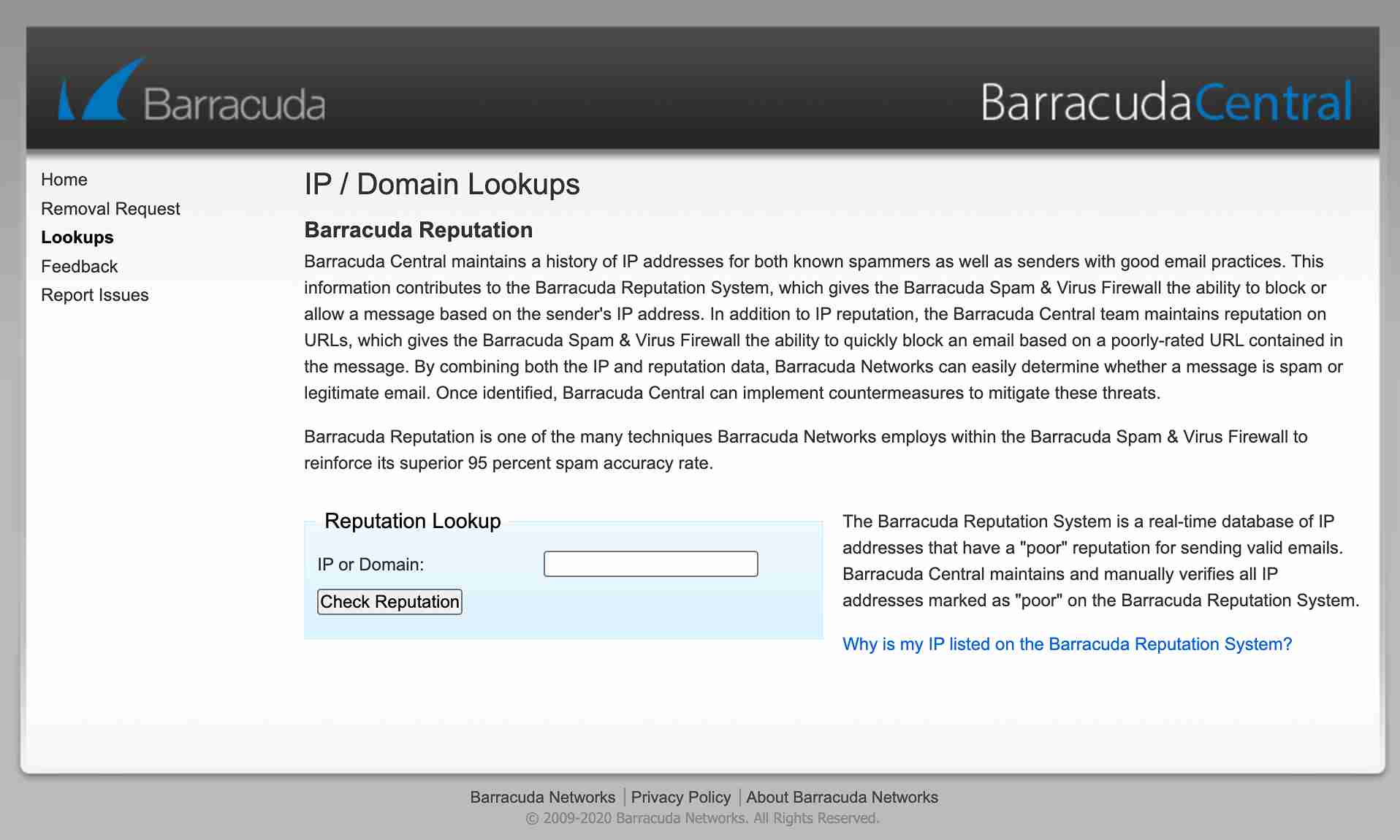
The impact depends heavily on who you’re sending to. For recipients on enterprise security appliances, smaller ISPs, and private mail servers that use Barracuda, a BRBL listing can mean hard blocks or quarantine.
For recipients on Gmail or Microsoft 365, the impact is far smaller — those providers rely on their own internal engagement signals rather than external blocklists. In practice, this makes the BRBL primarily a B2B deliverability problem, not a consumer email problem.
That said, ignoring it is a mistake. A listing that sits unresolved signals poor sender hygiene to every filter that checks it, and some of your enterprise contacts will simply stop receiving your mail without any bounce notification.
What triggers a Barracuda listing?
Most listings trace back to one of four root causes.
Spam and infrastructure abuse
Sending to spam traps or honeypots is the most common trigger. These are hidden addresses designed to catch senders who scrape or buy contact lists. A single hit can flag your IP. Running an open relay — a mail server configured to allow unauthorized parties to route email through it — is equally damaging and one of the fastest routes to a BRBL listing.
Compromised accounts or servers
Many listings happen without the sender’s knowledge. A hijacked mailbox or botnet-infected server can send thousands of spam messages overnight. If your sender reputation drops suddenly and you can’t explain why, check for compromised accounts before anything else.
Poor list hygiene
Stale lists accumulate risk. Addresses that were valid a year ago can be converted into spam traps by providers, meaning mailing them poses an ongoing threat to your IP reputation. Dynamic IPs previously used by spammers carry the same hazard — the history follows the address, not the user.
Technical misconfigurations
Missing or broken authentication records, incorrect PTR records, and SMTP banner inconsistencies all signal poor server management. Barracuda’s automated systems flag these as reputation risk factors even when no spam has been sent.
How do you remove your IP from the Barracuda blacklist?
The removal process follows a strict sequence. Skipping the preparation steps and going straight to the form is one of the most common — and costly — mistakes senders make.
Step 1: Fix the root cause
Do not submit the removal request until the underlying issue is resolved. Barracuda’s system will likely relist you within hours if the trigger still exists. Depending on your situation, this means:
- Securing compromised accounts (enable MFA immediately)
- Closing open relays and restricting outbound SMTP traffic to your mail server’s IP only
- Cleaning your list with a verification tool before the next send
- Setting up valid SPF records, DKIM, and DMARC records if they’re missing or broken
- Correcting your PTR record so your sending IP resolves back to the correct hostname
Step 2: Gather required information
The removal form at Barracuda Central requires:
- A working phone number
- The exact listed IP address
- A valid administrative email address
- A specific explanation of what was identified and fixed
The explanation field is not optional in practice, even if the form marks it otherwise. Vague responses like “the issue has been resolved” are frequently ignored. Specific language works — something like “Secured a compromised account that was sending unauthorized mail; enabled MFA on all user accounts; added SPF and DMARC records.”
Step 3: Submit once — then wait
The removal system is automated, and submitting multiple requests for the same IP signals noise to the system. One well-written, specific request is far more effective than repeated submissions. After submitting, allow the full 12–24 hours before assuming anything went wrong.
Step 4: Check for private appliance blocks
If your IP isn’t listed on the public BRBL but recipients at a specific organization still can’t receive your mail, that organization may have set a local block on their own Barracuda appliance — independent of the public list. In that case, contact their IT administrator directly. No public removal request will fix a private block.
How long does Barracuda delisting take?
Timeline varies by offense history. Senders who provide a detailed, technically accurate explanation in the form tend to see faster resolution than those who leave it vague — the automated system processes clearer signals more predictably.
Delisting timeline — by offense type
If 72 hours pass with no response and you’ve confirmed the issue is fixed, calling Barracuda’s helpdesk directly (408-342-5400) has resolved cases where the web form didn’t produce a response. Having a business partner who is an existing Barracuda customer open a support ticket on your behalf can also accelerate resolution.
What should you do after getting delisted?
Delisting is not the finish line. Returning to full sending volume immediately after removal can re-trigger reputation systems, especially if your inbox placement is still recovering. A 7-14 day warm-up period — gradually increasing volume while monitoring placement — reduces the risk of a repeat listing.
Beyond that, the prevention work starts here.
Authentication setup
Every sending domain needs valid SPF, DKIM, and DMARC records that pass consistently. Missing authentication is a signal that Barracuda weighs even when no spam is present. Use our free deliverability test to check how your authentication looks across 50+ mailbox providers before resuming normal volume.
List hygiene, ongoing
Email list hygiene isn’t a one-time fix. Remove hard bounces immediately. Suppress contacts who haven’t engaged in six months (those addresses can become traps). Implement double opt-in for new subscribers so invalid and mistyped addresses never enter your list in the first place.
Infrastructure monitoring
Set up alerts for unusual sending volumes and suspicious login patterns. CAPTCHA on web forms prevents mail bombing. MFA on all accounts closes the most common route for account compromise. Run regular checks on the email blacklist databases most relevant to your audience — not just Barracuda.
Ongoing deliverability support
If your team keeps hitting blacklists — or if you’ve had a Barracuda listing alongside other deliverability failures — the underlying issue is usually systemic, not isolated. An email deliverability consultant can run a full infrastructure audit, identify every gap across authentication, reputation, and domain reputation, and walk your team through fixes with ongoing monitoring.
EmailWarmup.com offers unlimited deliverability consultation as part of its platform — covering everything from blacklist remediation to sender reputation recovery — without upsells or one-size-fits-all advice.
Barracuda blacklist vs. other blocklists
Senders often confuse the BRBL with broader or more impactful lists. The distinction matters for prioritization — a Barracuda listing without a Spamhaus or Microsoft listing is a focused problem; appearing on multiple lists simultaneously points to infrastructure-level failure.
| Blocklist | Scope | Primarily affects | Self-service removal |
| Barracuda BRBL | IP addresses | Enterprise and private mail servers | Yes — manual via portal |
| Spamhaus SBL/XBL | IPs and domains | Global — high deliverability impact | Yes — varies by list |
| Microsoft SNDS | IP reputation | Microsoft 365 and Outlook | Yes — via SNDS portal |
| Google Postmaster | Domain reputation | Gmail | Indirect — reputation repair only |
If you’re appearing on multiple lists simultaneously, the root cause is almost certainly infrastructure-level, and a single removal request won’t solve it — you need a full email deliverability audit.
We can take care of Barracuda delisting!
Need help diagnosing a persistent blacklist issue or recovering from a reputation drop? EmailWarmup.com’s email deliverability consultant service includes:
- A full audit
- Authentication setup
- Email warmup and blacklist remediation
- Unlimited expert guidance — starting with a free consultation.
Let’s get it started!
Frequently asked questions
Here are some commonly asked questions about Barracuda delisting:
Usually not. Gmail and Microsoft 365 rely on their own proprietary reputation signals rather than the BRBL. A BRBL listing primarily blocks emails going to organizations running Barracuda security appliances — typically enterprise and mid-market companies. That said, ongoing poor sender behavior that leads to a BRBL listing will often damage your reputation across other systems over time.
Query the BRBL directly at b.barracudacentral.org using a DNS lookup tool, or use a blacklist check tool that covers multiple blocklists simultaneously. The free email deliverability test at EmailWarmup.com checks placement and authentication across 50+ providers and will surface BRBL-related issues as part of the report.
Check whether the receiving organization has set a local block on their private Barracuda appliance. Public delisting doesn’t override local rules configured by individual IT administrators. Contact that organization’s IT team directly and provide confirmation of your delisting from Barracuda Central.
Query the BRBL directly at b.barracudacentral.org using a DNS lookup tool, or use a blacklist check tool that covers multiple blocklists simultaneously. The free email deliverability test at EmailWarmup.com checks placement and authentication across 50+ providers and will surface BRBL-related issues as part of the report.
Yes. Legitimate delisting from Barracuda Central costs nothing. Any third-party service charging a fee to remove your IP from the BRBL is either a scam or providing no real value — the only path is the official portal.



