



Yesware (now Vendasta Yesware) has been around since the early days of email tracking — one of the first tools that let sales reps see when someone opened their message. It sits inside Gmail or Outlook as a Chrome extension or add-in, providing email tracking, templates, campaigns, meeting scheduling, and Salesforce integration.
The product changed hands when Vendasta acquired it, and the transition hasn’t been smooth.
Multiple recent reviews describe deteriorating support, features that stop working without explanation, and a UI that feels dated compared to modern alternatives. The G2 rating (4.4/5 across 821 reviews) reflects historical satisfaction, but the recent trajectory skews negative.
At $15-$65/user/month, Yesware is one of the cheapest tools in the category.
But the campaign limits (1,000 recipients per upload, 5,000 per campaign), the restriction of core features to expensive tiers, and the absence of any deliverability management raise the question: Is it cheap enough when the product isn’t keeping up?
This review covers:
- Who still gets value, and who should move on
- Pricing across Free, Pro, Premium, and Enterprise tiers
- Campaign limitations and what’s locked behind higher tiers
- Email tracking quality and where firewall inflation distorts data
- What the post-Vendasta acquisition means for support and product development
TLDR: Yesware at a glance
Here is Yesware overview summarized:
| Category | Detail |
| What it is | Email outreach and tracking tool for Gmail/Outlook with templates, campaigns, scheduling, and Salesforce reporting |
| Best for | Solo reps needing basic email tracking at the lowest possible price point |
| Deliverability tooling | None — no warmup, no inbox rotation, no inbox health monitoring |
| Main limitation | Campaigns and mail merge locked behind Premium ($35/mo) and Enterprise ($65/mo) |
| Best-fit user | Individual sales reps doing low-volume email outreach who don’t need multi-channel |
How much does Yesware cost in 2026?
Yesware’s pricing is published and straightforward — but the feature gating makes the lower tiers less useful than they appear.
| Plan | Monthly per user | What it includes | Key restrictions |
| Free | $0 | Basic email tracking (24hr only), meeting scheduler | Tracking expires after 24 hours, 10 campaign recipients/month |
| Pro | $15 (annual) / $19 (monthly) | Unlimited tracking, templates, personal reports | No campaigns, no mail merge, 20 recipients/month |
| Premium | $35 (annual) / $45 (monthly) | Campaigns, mail merge, team reporting, unlimited teams | 1,000 recipients/upload, 5,000/campaign |
| Enterprise | $65 (annual) / $85 (monthly) | Salesforce integration, trusted IP ranges | Same sending limits as Premium |
| Prospector add-on | $37.50/mo (annual) | 600 credits/year, 100M+ B2B contact database | Separate purchase, not included in any plan |
The pricing looks competitive until you realize that campaigns (the core outbound feature) require at minimum the $35/month Premium plan. Salesforce integration requires Enterprise at $65/month.
And the Prospector add-on is an additional $37.50/month. A team of 10 on Enterprise with Prospector hits $12,300/year — at which point Mixmax ($10,680/year for the full bundle) or Reply.io (~$11,880/year for multichannel) deliver significantly more capability.
What does Yesware reveal in real email workflows?
Yesware’s core value sits in email tracking and templates — the features it was originally built for. Here’s how the main capabilities hold up today.
Email tracking
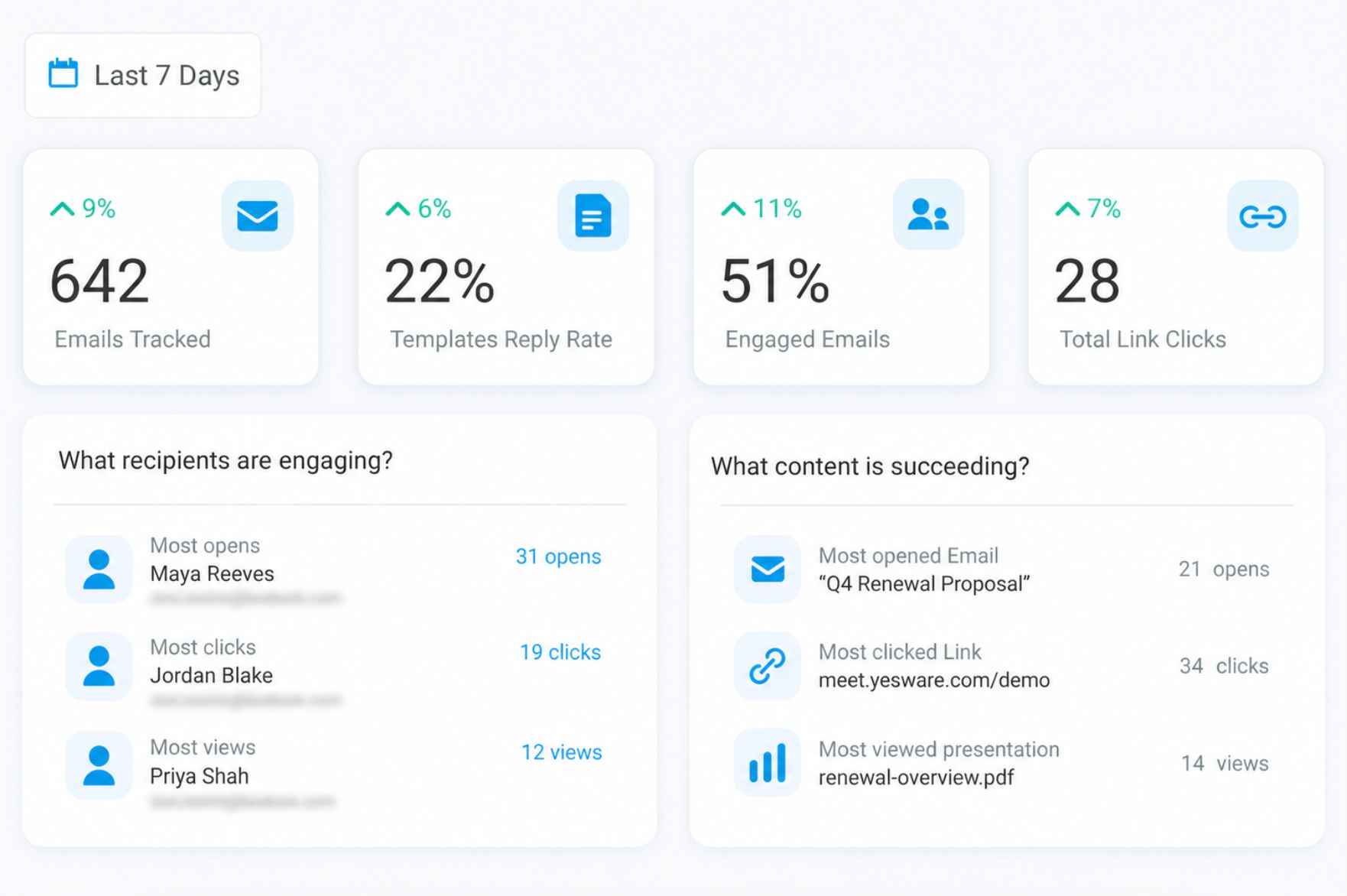
Open and click tracking work as expected — you see when someone opens your email, how many times, and whether they clicked links. The tracking integrates directly into Gmail and Outlook, showing alerts inline. For solo reps managing 20-50 outbound emails per day, this remains useful.
The accuracy problem is firewalls. Multiple users report that anti-virus programs and corporate firewalls trigger false opens — inflating tracking stats and making analytics unreliable.
You think a prospect opened your email three times, but it was their security software scanning the tracking pixel. This is a known limitation across most pixel-based trackers, but Yesware provides no way to filter false positives.
Campaigns and templates
Templates save time for repetitive emails and are available on all plans. Campaigns (automated multi-step email sequences) require Premium ($35/month) or higher.
Even on Premium, campaigns are capped at 1,000 recipients per upload and 5,000 per campaign — limits that constrain any team running real outbound at volume.
Once a campaign is launched, you can’t edit it. Multiple G2 reviewers describe this as a significant frustration — any mistake in copy, timing, or targeting requires creating an entirely new campaign rather than adjusting the live one.
Post-acquisition support
The Vendasta acquisition has introduced support gaps. Multiple recent G2 and Trustpilot reviews describe unanswered tickets, features that break with no response, and inability to contact anyone for account upgrades.
One G2 reviewer rated it 0/5, describing a product that’s “faulty and not working” with no support response. Another described waiting over a week to upgrade their subscription with no one responding.
What are the pros and cons of Yesware?
Yesware is cheap and simple — but cheap and simple increasingly means limited and unsupported. The post-acquisition trajectory suggests a product in maintenance mode rather than active development.
Who should and shouldn’t use Yesware?
Yesware fits a shrinking buyer profile — solo reps or very small teams that only need basic email tracking at the cheapest price. The product’s trajectory suggests teams should evaluate carefully before committing.
Who should use it
- Teams already using Yesware who haven’t hit the feature ceiling yet
- Users who want templates and Send Later without learning a complex platform
- Solo sales reps who need basic email tracking in Gmail or Outlook at $15/month
- Individual contributors doing low-volume outreach (under 50 emails/day)
Who shouldn’t use it
- Teams that depend on accurate analytics (firewall inflation distorts data)
- Any team that needs campaigns on an affordable plan (gated behind $35+/month)
- Organizations that need Salesforce integration without paying $65/month per user
- Buyers who need reliable customer support (post-acquisition decline is documented)
- Anyone who needs deliverability management, multi-channel engagement, or prospecting
How does Yesware compare to the alternatives?
Yesware competes on price alone. On features, support, and product trajectory, modern alternatives have passed it.
Yesware scorecard for email-focused sales reps
Here’s how Yesware rates for its target buyer — individual contributors doing email-first outreach at low volume.
| Category | Rating | Notes |
| Sequencing depth | ★★☆☆☆ | Campaigns exist but capped and uneditable after launch |
| Deliverability management | ★☆☆☆☆ | No warmup, no inbox health, no deliverability metrics |
| CRM integration | ★★☆☆☆ | Salesforce only, locked behind $65/mo Enterprise tier |
| Reporting quality | ★★☆☆☆ | Basic tracking stats, inflated by firewall false opens |
| Ease of use | ★★★★☆ | Simple Chrome extension / Outlook add-in, minimal learning curve |
| Pricing fit | ★★★★☆ | Cheapest in category at $15/mo, but key features gated |
| EmailWarmup.com fit | ★★★★★ | High — no deliverability tools, no inbox health visibility |
How does Yesware fit into an email outreach workflow?
Yesware is designed as a lightweight layer on top of Gmail or Outlook — not a standalone platform. Here’s the operational picture.
Setup and onboarding
Install the Chrome extension or Outlook add-in and you’re tracking emails within minutes. Templates are easy to create. Campaign setup (Premium+) is straightforward.
No admin expertise required, no onboarding fee, no lengthy implementation. The simplicity is genuine — but post-Vendasta, the support to help when things break is no longer reliable.
Integration depth
Gmail and Outlook are the primary environments. Salesforce integration (Enterprise only) syncs activities and enables CRM reporting. LinkedIn Sales Navigator integration is available for importing contacts.
Beyond those, integration options are limited. No HubSpot, no Pipedrive, no Zapier-native connections. The Outlook add-on disconnects frequently, requiring manual reconnection — a friction point noted across multiple reviews.
Sending limits and scaling
Yesware sends through your connected Gmail or Outlook account, inheriting their sending limits. Campaigns are capped at 1,000 recipients per upload and 5,000 per campaign.
There’s no warmup, no inbox rotation, and no deliverability monitoring.
Yesware also doesn’t report deliverability metrics — you have no visibility into how many emails actually reached the inbox versus spam. For teams sending more than 50 emails per day, these limitations become a constraint.
What happens after you stop using Yesware?
Email tracking history stays inside Yesware and doesn’t export. Templates can be manually copied. Campaign data is lost. Salesforce-logged activities persist in your CRM. The transition out is clean, but you lose access to all historical tracking data and template libraries.
What Yesware can’t protect — and why tracking alone isn’t enough
Yesware tells you when someone opens your email.
What it can’t tell you is whether that email actually reached the inbox, whether your domain reputation is degrading, or whether the next 100 emails you send will land in spam. Tracking without deliverability management gives you a false sense of visibility — you see opens, but you don’t see the emails that never arrived.
EmailWarmup.com fills that gap:
- Personalized warmup matched to each domain’s sending behavior
- Automatic detection and replacement of underperforming sending domains
- Soft bounce LinkedIn fallback — emails that fail silently trigger a LinkedIn message
- Continuous mailbox health monitoring across all connected accounts
- Free SPF, DKIM, DMARC, and domain reputation diagnostic tools
The consultation is free, no subscription required. If your team relies on Yesware for email outreach and has never tested inbox placement, speak with a deliverability expert — tracking opens means nothing if a third of your emails are hitting spam.
Final verdict on Yesware
Yesware was a pioneer in email tracking. In 2026, it’s a budget tool with deteriorating support, gated features, and no clear product roadmap under Vendasta. For solo reps who need basic tracking at $15/month, it still does the job. For everyone else, the category has moved on.
- Templates and Send Later are genuinely useful time-savers
- Campaigns require Premium ($35/mo) and can’t be edited after launch
- Customer support has declined significantly since the Vendasta acquisition
- Salesforce integration requires Enterprise ($65/mo) — expensive for what you get
- Email tracking in Gmail/Outlook remains functional at the most basic level
- No deliverability metrics, no warmup, no inbox health monitoring
If you’re paying more than $15/month for Yesware, you should evaluate whether Mixmax, Reply.io, or Apollo would deliver more at a similar or slightly higher price point.
Frequently asked questions about Yesware
Here are the most common questions buyers ask before choosing Yesware.
Yesware has a Free plan, but it is limited to basic tracking, 10 campaign recipients per month, meeting scheduling, and email support. Paid plans start at Pro for $15 per seat per month, Premium at $35 per seat per month, and Enterprise at $65 per seat per month when billed annually. Monthly billing is higher: Pro is $19, Premium is $45, and Enterprise is $85 per seat. Prospector is a paid add-on starting at $37.50 per month, billed annually.
Yesware works without Salesforce on the Free, Pro, and Premium plans, but its actual Salesforce integration is reserved for Enterprise. That plan includes the Salesforce inbox sidebar, sent email sync, reply sync, calendar sync, background sync, bi-directional activity sync, Salesforce list-view imports, Salesforce single sign-on, and trusted IP ranges. So if a team only needs Gmail or Outlook tracking, lower plans may work, but teams that need Salesforce as the system of record should budget for Enterprise.
Yesware is still active after Vendasta acquired it in October 2022, and the product continues to list support options, including support email, phone support on paid plans, help center access, and customer success features on higher tiers. That said, support feedback is mixed rather than uniformly strong. Capterra lists Yesware at 4.0 for customer service, while recent TrustRadius reviews still show active usage but mention gaps such as limited mobile support and spam-protection concerns.
No. Yesware has email tracking, templates, campaigns, meeting scheduling, reporting, CRM sync, and Prospector credits, but its pricing page does not list email warmup, inbox rotation, sender reputation repair, seed testing, or inbox placement monitoring as product features. Its deliverability documentation also says Yesware sends through the user’s Google or Microsoft mail server and does not modify the sending IP, which means sender reputation depends on the user’s mailbox and domain setup, not Yesware-managed warmup infrastructure.



