



BIMI (Brand Indicators for Message Identification) is an email specification that displays your verified brand logo next to authenticated messages in supported inboxes — a visual trust signal that rewards strong sender authentication. The standard sits on top of SPF, DKIM, and DMARC, acting as the visible layer of an authentication stack that most recipients never see.
For mailbox providers like Gmail, Yahoo Mail, and Apple Mail, BIMI bridges the gap between technical security and human recognition. When authentication passes and verification checks complete, recipients see your logo instead of a generic avatar (the kind that makes even legitimate emails look suspicious).
The prerequisites for BIMI are:
- DMARC at enforcement
- An SVG meeting precise specifications
- A Verified Mark Certificate tied to a trademarked logo
With roughly 17% of marketing emails failing to reach inboxes, standing out is important — but the logo is a reward for authentication you’ve already completed, not a shortcut around it.
In this guide, we’ll be exploring:
- How to implement and validate BIMI
- Which providers support BIMI (and which don’t)
- Why BIMI matters for security and brand recognition
- Requirements for logos, certificates, and DNS records
- How BIMI works with your existing authentication stack
- The relationship between BIMI and DMARC enforcement
- Why your logo might not display even when configured correctly
Quick skim — BIMI overview
The table below summarizes what BIMI does, what it requires, and what it delivers.
| Aspect | Details |
| Full name | Brand Indicators for Message Identification |
| Also known as | BIMI record, BIMI logo, brand logo in email |
| What it does | Displays verified brand logos next to authenticated emails in supported inboxes |
| Authentication foundation | SPF, DKIM, and DMARC (at enforcement level) |
| Certificate requirement | VMC (Gmail, Apple Mail) or CMC (Yahoo, Fastmail) |
| Logo format | SVG Tiny Portable/Secure (SVG Tiny PS), square, under 32KB |
| DNS record type | TXT record at default._bimi.[domain] |
| Primary benefit | Visual trust signal + reduced brand impersonation |
| Developed by | BIMI Group (AuthIndicators Working Group) |
Why is BIMI important in 2026?
BIMI transforms invisible authentication into visible trust. Before BIMI, senders invested in SPF, DKIM, and DMARC without recipients ever knowing those protections existed.
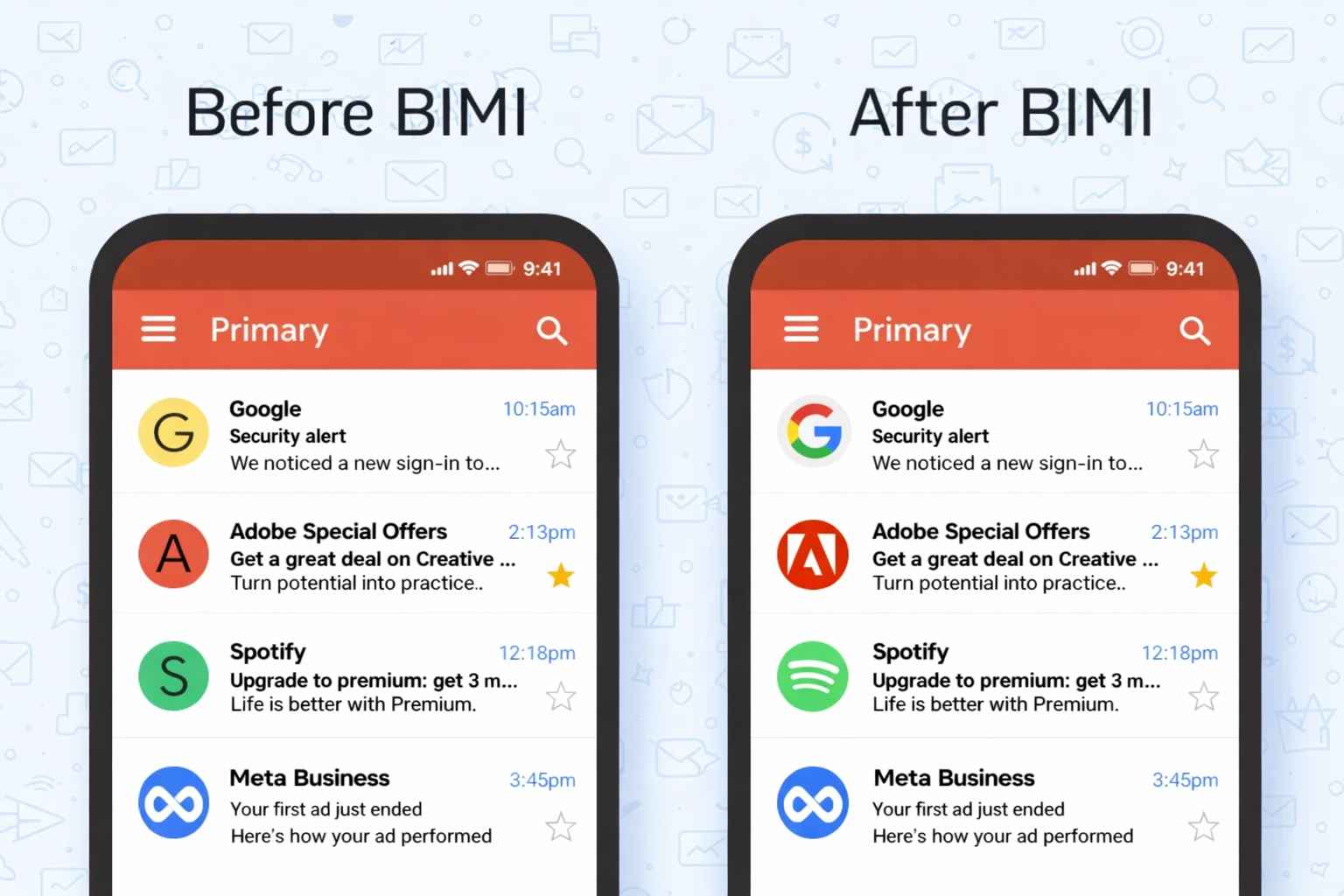
The authentication worked behind the scenes, but nothing in the inbox signaled “this sender proved they’re legitimate.”
Security benefits
Email remains a primary vector for phishing and brand impersonation attacks. BIMI addresses both by requiring verified authentication before displaying any logo.
- Recipients can visually identify legitimate messages from trusted brands
- Phishing emails using your domain won’t display your logo (they fail DMARC)
- Brand impersonation becomes harder when real senders have verified visual markers
- Spoofed messages default to generic avatars, creating visible contrast
The BIMI Group (the AuthIndicators Working Group advancing this standard through IETF draft work) designed the specification specifically to bridge security infrastructure with human-visible indicators.
Marketing benefits
Beyond security, BIMI offers genuine marketing value — though not in the way some vendors pitch it.
- Brand recognition builds through consistent visual presence
- The verification checkmark (in Gmail) signals additional credibility
- Your logo appears in crowded inboxes before recipients open anything
- Open rates may improve when recipients instantly recognize the sender
One thing worth clarifying here is that BIMI doesn’t directly improve deliverability. Your emails won’t suddenly avoid spam folders because you implemented BIMI. The DMARC enforcement required for BIMI improves deliverability — the logo itself is purely visual.
How do BIMI and DMARC work together?
BIMI doesn’t function independently. The entire system layers on top of your existing authentication protocols, with DMARC serving as the enforcement mechanism that makes BIMI possible.
Authentication stack
Email authentication works in layers, each building on the previous:
When an email arrives, the recipient’s mailbox provider checks SPF (did an authorized server send this?), verifies DKIM (was the message altered?), and applies your DMARC policy (what happens when checks fail?). Only after all authentication passes does the provider query your BIMI record.
Enforcement requirements
BIMI demands DMARC at the enforcement level — not monitoring mode.
| Setting | Requirement |
| Policy (p=) | quarantine or reject |
| Percentage (pct=) | 100 |
| Alignment | SPF or DKIM must align with From domain |
Policies set to p=none don’t qualify. Microsoft’s authentication mandate (enforced May 5, 2025) already requires SPF, DKIM, and DMARC for bulk senders. If you’re compliant with those requirements, you’re halfway to BIMI readiness — the remaining gap is moving from p=none to enforcement.
The alignment piece catches many senders off guard. SPF or DKIM alignment means the domain in those checks must match (or be a subdomain of) your From address domain. Third-party sending platforms sometimes break this alignment without proper configuration.
What does BIMI require before implementation?
The prerequisites are non-negotiable. Skip one and the entire system fails silently — you won’t receive error messages or bounce notifications telling you why the logo doesn’t display.
DMARC requirements
Your DMARC record must specify policy enforcement with full application:
- pct=100 (applying to all messages)
- p=quarantine or p=reject (not p=none)
- Either SPF or DKIM alignment with your From domain
Organizations still at p=none need to analyze DMARC reports, identify all legitimate sending sources, and configure proper authentication before moving to enforcement.
Rushing this step causes legitimate mail to fail authentication. To validate if your DMARC is working properly, you can use our free DMARC lookup tool.
Logo requirements
Your existing logo file almost certainly won’t work. BIMI requires precise formatting that most brand assets don’t meet out of the box.
| Requirement | Specification |
| Format | SVG Tiny Portable/Secure (SVG Tiny PS) |
| Profile | baseProfile=”tiny-ps” version=”1.2″ |
| Shape | Square, 1:1 aspect ratio |
| Dimensions | Absolute pixel values (not relative), minimum 96×96 |
| Size limit | 32KB or smaller |
| Background | Solid color recommended (transparent may not render) |
Several elements are explicitly prohibited:
- Scripts or JavaScript
- External links or references
- Text (must convert to outlines)
- Animations or interactive elements
- Relative dimensions (x= or y= attributes in root)
The SVG Tiny PS profile is stricter than standard SVG. Most designers haven’t heard of this format — you’ll likely need a BIMI-specific converter or manual preparation in a vector editor. The <desc> element is recommended for accessibility.
Certificate requirements
The certificate portion involves additional technical specifications beyond the logo itself.
For the PEM file (your certificate):
- Host on HTTPS with TLS 1.2 or later
- Ensure the certificate chain validates completely
- Append intermediate and root CA certificates in correct order
For logo hosting:
- Serve over HTTPS (HTTP fails)
- Use a reliable, fast server (providers check accessibility)
- Ensure the URL remains stable (changes require DNS updates)
Do you need a Verified Mark Certificate?
Whether you need a VMC depends entirely on which inboxes matter to your business. Different providers have different requirements, and this is where implementation complexity increases.
Certificate comparison
Three paths exist for BIMI implementation, each with different verification levels and provider support.
The a= portion of your BIMI record is technically optional. When absent, the record is self-asserted. Mailbox providers then decide whether to display your logo based on their own reputation assessments and policy rules — most won’t for self-asserted records.
VMC path
Obtaining a VMC involves more than technical configuration. The process requires trademark infrastructure.
- Certificate costs approximately $1,000-1,500 annually
- The trademark process takes 6-12 months if not already registered
- Logo must be trademarked with a recognized intellectual property office
- Certificate Authorities (DigiCert, Entrust) verify trademark ownership against official registries
The CA issues a PEM file containing your SVG logo embedded within the certificate. Certificate Transparency (CT) logs ensure the validation is publicly auditable.
CMC path
If trademarking isn’t feasible, Common Mark Certificates offer a limited alternative. CMCs validate domain ownership without requiring trademark registration.
You can go for a CMC if you have:
- Rapid deployment timelines
- Organizations without registered trademarks
- Yahoo and Fastmail audiences (where CMC is accepted)
CMCs don’t work for:
- Gmail visibility (requires VMC)
- Maximum verification signaling
- Apple Mail display (requires VMC)
For brands serious about Gmail visibility (and Gmail processes nearly half of all email opens), the VMC path is unavoidable.
Which email providers support BIMI?
Provider support has grown substantially since Gmail joined in 2021, though one major holdout remains conspicuously absent.
| Provider | Support | Certificate requirement | Notes |
| Gmail | Yes | VMC required | Checkmark appears with verified senders |
| Apple Mail | Yes | VMC required | iOS 16+, macOS Ventura 13+ |
| Yahoo Mail | Yes | CMC accepted (pilot) | High-reputation domains, bulk senders |
| AOL Mail | Yes | CMC accepted (pilot) | Same infrastructure as Yahoo |
| Fastmail | Yes | CMC accepted | Works for sent and received mail |
| La Poste | Yes | Varies | European provider with BIMI support |
| Outlook/Office 365 | No | N/A | No announced implementation plans |
Inbox appearance
Display behavior varies across platforms and devices:
- Mobile rendering may differ from desktop in logo size and placement
- Yahoo and AOL apply reputation and engagement rules before displaying
- Gmail web and mobile show a blue checkmark with VMC-verified senders
- Apple Mail displays logos in newer OS versions (iOS 16+, macOS Ventura 13+)
Display limitations
Even with a valid VMC, mailbox providers apply their own heuristics before displaying your logo. Several factors influence the decision:
- Overall sending behavior patterns
- Spam scoring from content analysis
- Sender reputation and domain reputation signals
- Engagement history (open rates, complaint rates)
- Bulk sender classification (Yahoo specifically considers bulk vs. personal mail)
A technically perfect BIMI setup paired with poor email reputation might still result in no logo display. The providers want to show logos from senders recipients trust — BIMI gives them a verified asset, but they still decide whether to display it.
How do you implement BIMI?
Once prerequisites are met, implementation involves three main phases. Taking shortcuts in any phase typically results in silent failures that are difficult to diagnose.
Prepare logo
Convert your brand logo to SVG Tiny PS format, meeting all specifications. Test with BIMI validator tools before proceeding — discovering format issues after DNS propagation wastes days.
The conversion process typically requires:
- Exporting to SVG from your vector editor
- Converting all text to outlines (editable text fails validation)
- Setting baseProfile=”tiny-ps” and version=”1.2″
- Removing any scripts, animations, or external references
- Setting explicit absolute width and height (no percentages)
- Verifying file size stays under 32KB
- Testing against BIMI validation tools
Host the final SVG on an HTTPS server with TLS 1.2 or later. The URL must remain accessible — providers check it when processing messages.
Obtain certificate
For Gmail and Apple Mail visibility, apply for a VMC through DigiCert or Entrust. Provide trademark documentation and your prepared SVG file.
The Certificate Authority:
- Validates your control over the domain
- Verifies trademark ownership against official registries
- Issues your PEM file (usually within days if documentation is complete)
Append intermediate and root CA certificates to the PEM file in the correct order before uploading to your server. The certificate chain must validate completely — partial chains fail silently.
Publish DNS
Create a TXT record at default._bimi.[yourdomain.com] with this format:
v=BIMI1; l=https://[logo-url]; a=https://[certificate-url]
Both URLs must use HTTPS. For self-asserted BIMI (limited support), omit the a= parameter.
After DNS propagation (typically 24-48 hours, sometimes longer), send test emails to Gmail and Yahoo accounts to verify logo display. Use the dig command to confirm your record is published:
dig TXT default._bimi.yourdomain.com
How do you validate BIMI after setup?
Validation requires checking multiple layers, since BIMI can fail at any point in the authentication chain.
Validation steps
Work through each layer systematically:
- Confirm SPF passes for your sending infrastructure
- Confirm DKIM signatures validate correctly
- Confirm DMARC alignment (SPF or DKIM must align with From domain)
- Verify DMARC policy is at enforcement (quarantine or reject, pct=100)
- Check the BIMI TXT record resolves correctly via DNS
- Fetch the SVG URL in a browser — confirm it loads over HTTPS
- Fetch the PEM URL — confirm the certificate chain is complete
- Send test emails to Gmail, Yahoo, and Apple Mail accounts
- Check whether logos display (allow 24-48 hours for initial display)
Validation tools
Several tools help diagnose BIMI issues:
- BIMI Group’s official validator at bimigroup.org
- Google Admin Toolbox for Gmail-specific checks
- EmailWarmup’s email deliverability test for authentication verification
If the logo doesn’t appear after validation passes, provider reputation heuristics may be suppressing display — which moves the problem from BIMI configuration to overall sender reputation.
Why is your BIMI logo not showing?
Silent failures are common with BIMI. The system doesn’t send error notifications when something goes wrong — your logo simply doesn’t appear.
Authentication failures
The most frequent causes involve the authentication foundation:
- SPF doesn’t align with the From domain
- DKIM doesn’t align with the From domain
- Third-party sending service breaks alignment
- DMARC policy still at p=none (not enforcement)
- DMARC percentage set below 100 (pct=50, for example)
Check your DMARC reports to identify authentication failures. A single misaligned sending source can prevent logo display for all mail from that source.
Configuration errors
Beyond authentication, technical setup problems include:
- VMC missing where required (Gmail, Apple Mail)
- DNS propagation hasn’t completed (can take up to 72 hours)
- SVG contains prohibited elements (scripts, animations, external links)
- SVG doesn’t meet Tiny PS requirements (wrong profile, relative dimensions)
- PEM file is inaccessible or incomplete (certificate chain broken)
- DNS caching delays updates (TTL hasn’t expired)
- Certificate URL returns HTTP instead of HTTPS
Provider suppression
Even with correct configuration, providers may suppress logo display:
- High spam complaint rates reduce trust signals
- Low sender reputation triggers additional scrutiny
- Mailbox provider doesn’t support your configuration
- You’re not classified as a bulk sender (Yahoo specifically)
- Low engagement history (opens, clicks) indicates recipient disinterest
The frustrating reality is that providers don’t tell you why they’re not displaying your logo. You can only infer from overall reputation metrics and authentication reports.
Subdomain issues
BIMI on subdomains requires careful attention. Yahoo honors BIMI on subdomains but prefers records at the organizational domain level. Some providers look for BIMI records at both the sending subdomain and the parent domain.
For organizations sending from multiple subdomains:
- Test subdomain-specific records if needed
- Consider publishing BIMI at the organizational domain
- Ensure DMARC alignment covers all sending subdomains
Is BIMI worth the investment?
The answer depends on where you’re starting and what you’re hoping to achieve.
When to implement
BIMI fits naturally when:
- You already have DMARC at enforcement
- Your audience uses Gmail and Apple Mail primarily
- Brand recognition in the inbox carries strategic value
- Your logo is trademarked (or you’re willing to invest in that process)
- You send high volumes (bulk sender classification helps with Yahoo display)
The implementation cost (VMC fees plus technical setup) pays off through increased brand visibility and the trust signal a verified logo provides. For B2C companies with large Gmail audiences, the visibility gain can be meaningful.
When to skip
BIMI probably isn’t worth it when:
- You’re still working toward DMARC enforcement
- Your sending volume is too low to qualify as a bulk sender
- Your audience is heavily Outlook-based (Microsoft doesn’t support BIMI)
- You’re expecting deliverability improvements (BIMI doesn’t provide them)
- Your logo isn’t trademarked (and you don’t want to invest in that 6-12 month process)
That last point deserves emphasis — BIMI doesn’t affect inbox placement. Your emails won’t suddenly avoid spam folders because you implemented BIMI. The DMARC enforcement required for BIMI improves deliverability; the logo itself is purely visual.
Audience ROI
The table below maps audience profiles to BIMI value:
Frequently asked questions
Here are some commonly asked questions about BIMI:
BIMI protects against domain spoofing (attackers sending from your exact domain) by requiring DMARC enforcement before logo display. Spoofed emails fail authentication and show generic avatars, creating visual contrast with legitimate messages. However, BIMI doesn’t prevent lookalike domain attacks (where attackers register similar domains like br4nd.com instead of brand.com) or phishing attempts from entirely different domains. Recipients still need to verify sender addresses, especially for sensitive requests. BIMI is one layer of defense, not a complete solution to email-based social engineering.
Yes, BIMI records can be published at subdomain level (default._bimi.marketing.yourdomain.com) or organizational domain level (default._bimi.yourdomain.com). Yahoo prefers organizational domain records but honors subdomain-specific records. The challenge is DMARC alignment — your subdomain’s sending sources must align properly with either SPF or DKIM. Some organizations publish a single BIMI record at the organizational level to cover all subdomains, while others maintain separate records for different sending streams. Test both approaches if you have complex subdomain structures.
DNS propagation for BIMI TXT records typically takes 24-48 hours, though some resolvers may take up to 72 hours depending on TTL settings and caching behavior. During this window, you may see inconsistent results — logos appearing for some recipients but not others. Set a low TTL (300-600 seconds) initially for faster updates during testing, then increase it after validation. You can verify propagation using dig or online DNS lookup tools. Even after propagation completes, mailbox providers may have their own caching that delays logo display for another few hours.
When a VMC expires, mailbox providers stop displaying your logo because the certificate chain no longer validates. The BIMI record still exists, but the a= parameter points to an invalid certificate. Gmail and Apple Mail will revert to generic avatars for your messages. You’ll need to renew with your Certificate Authority (DigiCert or Entrust) before expiration — most CAs send renewal reminders 60-90 days in advance. Update the PEM file on your server and allow providers to recache the new certificate. Plan renewals well before expiration to avoid display gaps.
Gmail’s checkmark indicates VMC verification — a third-party Certificate Authority validated your trademark ownership and domain control. Yahoo’s pilot program accepts CMC (Common Mark Certificates) and even reputation-based display for high-volume senders, which don’t require trademark verification. Different providers made different policy decisions about verification requirements. Gmail chose stronger verification but limited initial rollout; Yahoo chose broader accessibility but weaker verification guarantees. Neither approach is wrong — they reflect different tradeoffs between security signaling and adoption friction. The checkmark specifically signals trademark verification, not just BIMI presence.
Yes, but the platform must send with proper SPF and DKIM alignment to your domain. Most transactional email platforms (SendGrid, Postmark, Amazon SES) support custom domain configuration that enables DMARC alignment. Configure the platform to sign with your DKIM key and either use your domain in the SPF record or rely on DKIM-only alignment. Test authentication thoroughly before expecting BIMI display. Some platforms make this easier than others — review documentation for “custom domain” or “white label” features. If the platform sends on shared infrastructure without domain customization, BIMI won’t work for those messages.
Email forwarding often breaks BIMI because forwarding modifies messages in ways that invalidate DKIM signatures and change the sending server (breaking SPF). When authentication fails at the final destination, BIMI logos don’t display. ARC (Authenticated Received Chain) helps preserve authentication through forwards, but not all providers implement it consistently. Mailing lists present similar challenges — most modify message content and envelope sender. Some list managers (like Google Groups) better preserve authentication than others. For forwarding scenarios, focus on ensuring ARC implementation on the forwarding infrastructure, though this remains outside sender control.



