
Unspam.email takes a different angle on email testing. Beyond standard spam scoring, the platform adds AI-powered heatmap predictions that simulate how subscribers visually engage with your newsletter layout.
The combination of deliverability diagnostics and design analysis is unusual — most spam testing tools stop at authentication checks and content scoring.
G2 reviews are positive (4.8/5 across 14 reviews), with users praising the clarity of deliverability insights and the inbox placement testing across multiple providers.
Product Hunt reviews (5.0/5 from 3 reviewers) describe the tool as genuinely useful for resolving deliverability issues. AppSumo reviews (5.0/5 from 9 users) highlight the heatmap feature as a standout differentiator.
The limitations are predictable for a tool at this scale. The free tier is restrictive, paid plans start at $9/month with limited test credits, and the platform provides no tools to actually fix the issues it identifies.
Unspam.email diagnoses problems well — but the gap between diagnosis and resolution remains the sender’s problem to solve.
This review covers:
- Where diagnostic testing fits in a deliverability strategy
- What Unspam.email’s spam testing and heatmap features deliver
- How inbox placement testing compares to simpler spam scoring tools
- A stronger alternative that connects testing to remediation
- Pricing tiers and where the value proposition holds
TLDR: Unspam.email at a glance
Here is a quick summary of what Unspam.email offers and where it sits.
| Category | Detail |
| What it is | Spam testing and inbox placement tool with AI heatmap predictions |
| Best for | Pre-send diagnostics with multi-provider inbox placement visibility |
| Deliverability impact | Diagnostic — shows where emails land and flags content/authentication issues |
| Main limitation | Limited test credits; no fixing tools; no ongoing monitoring |
| Best-fit user | Email marketers, SaaS teams, and deliverability consultants |
| EmailWarmup.com alternative fit | Email deliverability test for unlimited inbox placement testing across 50+ providers |
Is Unspam.email’s pricing worth it for spam testing?
Unspam.email uses a tiered subscription model with test credits:
- Basic — $9/month
- Business — $19/month
- Free — limited monthly tests (enough for a quick initial check)
Compared to MailGenius ($8-$39/month), the pricing is competitive — and Unspam.email arguably delivers more useful information per test (real inbox placement data vs. spam scores). Compared to Mail-Tester (limited free tests with unclear paid pricing), Unspam.email is more transparent about what each tier includes.
The free plan is restrictive enough that several G2 reviewers note upgrading is necessary for any regular use. One reviewer described the free tier as too expensive relative to the needs for individual use. For teams running weekly campaigns, the Basic or Business plan provides sufficient testing volume without breaking the budget.
The AI heatmap feature (which predicts where subscribers’ eyes will focus in your email design) has no direct equivalent in competing spam testing tools.
Whether that feature alone justifies the subscription depends on how much design optimization matters to your workflow — for ecommerce teams, it adds real value; for transactional senders, less so.
What Unspam.email’s testing reveals about deliverability
Unspam.email combines three testing layers that, together, provide a more complete pre-send picture than most competing tools.
Inbox placement testing
The standout feature is the inbox placement testing. Unspam.email tests where your email actually lands — inbox, spam, or promotions — across multiple providers.
G2 reviewers describe the placement reports as clear, actionable, and immediately useful for identifying provider-specific filtering issues.
One SaaS founder noted that the placement data showed exactly where marketing emails were being filtered, including specific recommendations for subject line changes and header fixes.
Spam filter checks
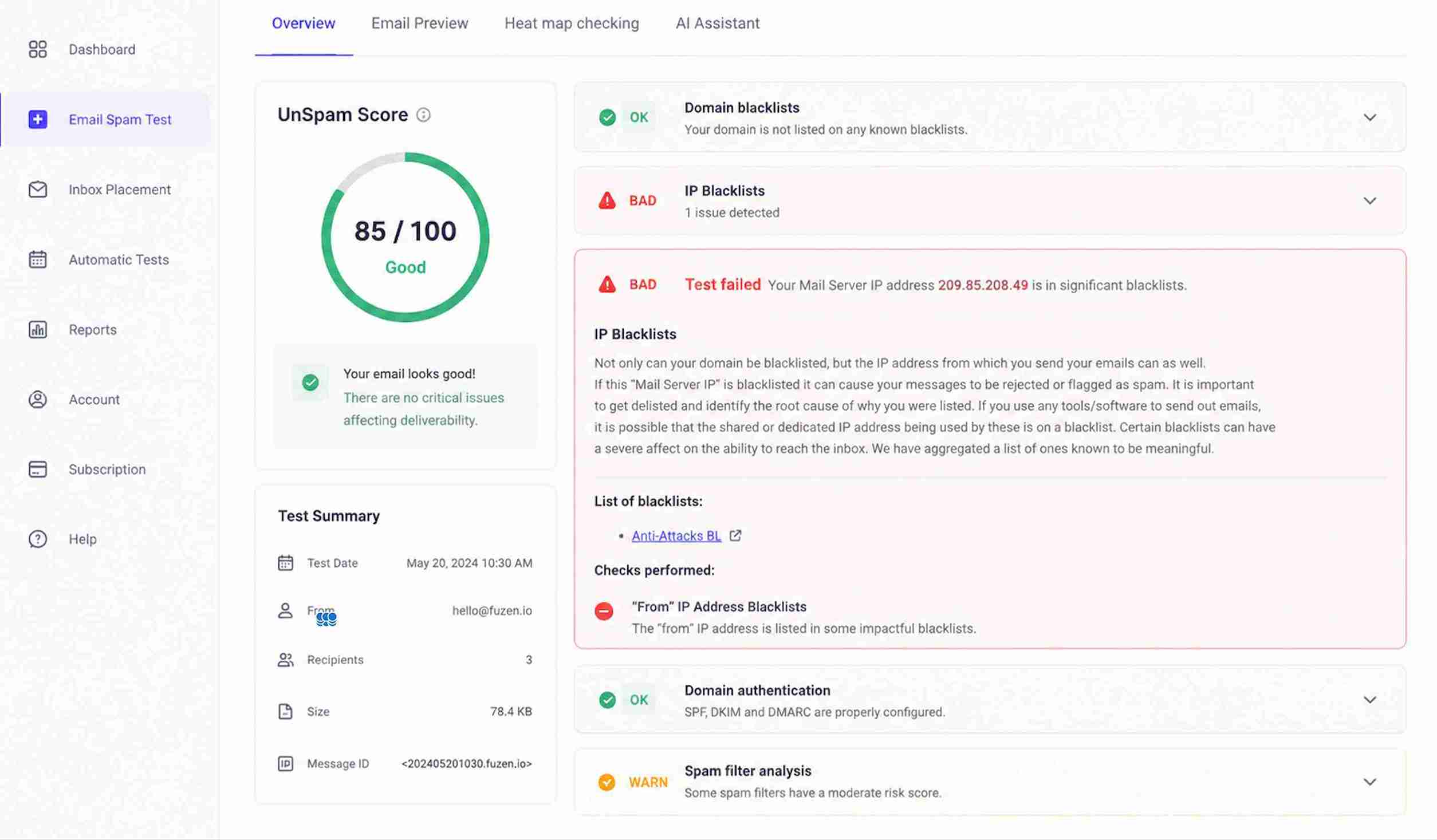
Authentication records (SPF, DKIM, DMARC) are evaluated alongside content analysis and blacklist checks. The diagnostics surface misconfigured records and content patterns that trigger spam filters. Multiple G2 reviewers cite the authentication reporting as the most immediately actionable part of the results.
AI heatmap prediction
The heatmap feature uses AI to predict how subscribers will visually scan your email layout.
AppSumo reviewers describe the heatmap as a useful addition for optimizing newsletter design — particularly for identifying whether key content and CTAs sit within the predicted visual focus areas.
The feature is more relevant for marketing emails than for transactional senders.
Pros and cons of Unspam.email
Unspam.email provides more robust diagnostics than most spam-testing tools, with the caveat that diagnostics alone do not fix deliverability problems.
- Real inbox placement testing across multiple providers (not just spam scoring)
- AI heatmap predictions for newsletter design optimization
- Clear, actionable deliverability reports praised by G2 reviewers
- No account required for basic spam checks
- Cross-device email preview for design validation
- Free tier too restrictive for regular use
- No tools to fix the problems diagnostics reveal
- No ongoing monitoring — point-in-time testing only
- Requires message ID insertion in subject/content for placement tracking
- Page load times described as slow by some G2 reviewers
Who should and shouldn’t use Unspam.email
Unspam.email provides greater diagnostic depth than competitors such as Mail-Tester or MailGenius. The fit depends on whether diagnostic testing alone meets your needs or whether you need testing connected to remediation.
Who should use Unspam.email
- Email marketers who need pre-send inbox placement visibility across providers
- Ecommerce teams that benefit from AI heatmap predictions for newsletter design
- Deliverability consultants who need quick, visual diagnostic reports for client audits
- SaaS teams sending transactional emails who want to verify the authentication configuration
Who shouldn’t use Unspam.email
- Teams that need unlimited testing without credit constraints
- Senders who need ongoing deliverability monitoring (not point-in-time snapshots)
- High-volume senders who need deliverability testing integrated into automated workflows
- Anyone who needs authentication setup, reputation repair, or infrastructure fixes alongside testing
Unspam.email scorecard for deliverability-focused teams
Here is how Unspam.email rates across categories relevant to teams evaluating spam testing tools.
| Category | Rating | Notes |
| Diagnostic depth | ★★★★☆ | Real inbox placement testing surpasses most competitors |
| Design analysis | ★★★★☆ | AI heatmap predictions are a genuine differentiator |
| Authentication checks | ★★★★☆ | Clear SPF, DKIM, DMARC reporting with recommendations |
| Ongoing monitoring | ★☆☆☆☆ | No continuous monitoring — snapshot testing only |
| Pricing value | ★★★½☆ | Reasonable for paid tiers; free tier is too limited |
| Fixing capability | ★☆☆☆☆ | Diagnoses problems but cannot implement fixes |
How Unspam.email fits into a pre-send testing workflow
Unspam.email works as a pre-campaign quality gate — a diagnostic step between drafting your email and hitting send.
Pre-send testing
Send your email to the Unspam.email test address (with the required message ID), wait for the report, and review inbox placement results across providers.
The process takes minutes and provides a clearer picture than simple spam scores. For teams sending weekly campaigns, running a test before each send catches configuration drift and content issues early.
Design optimization
The AI heatmap layer adds a visual design check that no competing spam tester provides.
For marketing teams sending image-heavy newsletters, the heatmap identifies whether key content areas (CTAs, product images, offers) fall within predicted visual focus zones. The feature is less relevant for plain-text or transactional senders.
The diagnostic ceiling
Unspam.email tells you where your email lands and what might be causing filtering.
Fixing the underlying problems — updating DNS records, repairing domain reputation, adjusting sending patterns — remains the sender’s responsibility.
The platform provides no tools, no guided workflows, and no expert consultation to bridge the gap between diagnosis and resolution.
What happens after you stop using Unspam.email?
No monitoring runs in the background after cancellation. Test results from previous checks remain accessible via email or saved URLs, but no historical tracking, trend analysis, or alerting persists.
The diagnostic capability disappears entirely — along with the heatmap and placement testing features.
For teams that relied on Unspam.email for periodic pre-send checks, cancellation means either switching to a different diagnostic tool or losing the testing workflow altogether. No lasting infrastructure value persists beyond the knowledge gained from previous reports.
A better alternative to Unspam.email | EmailWarmup.com
Unspam.email shows you where emails land across providers. EmailWarmup.com shows you where they land, why they land there, and gives you the tools and expertise to change the outcome.
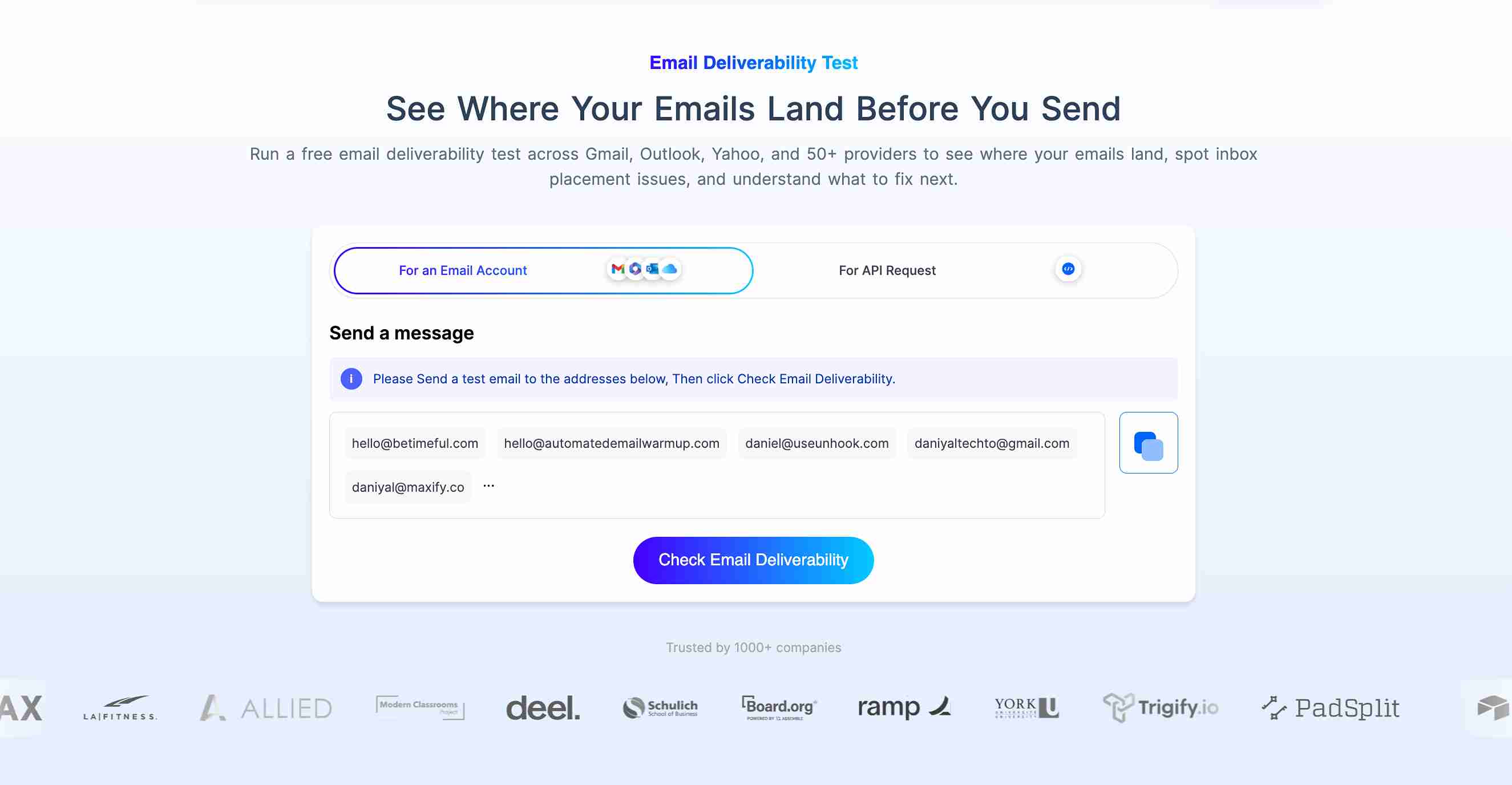
EmailWarmup.com’s email deliverability test provides:
- Unlimited inbox placement testing with no credit limits or subscription caps
- Reports distinguishing inbox, promotions, spam, and undelivered status per provider
- Placement results across Gmail, Outlook, Yahoo, Google Workspace, and 50+ mailbox providers
- Connection to a full 360° deliverability audit, authentication tools, and unlimited expert consultation
Unspam.email provides strong diagnostics. EmailWarmup.com provides diagnostics, tools, and expert guidance — the full cycle from testing to fixing to monitoring.
Final verdict on Unspam.email
Unspam.email is the strongest diagnostic spam testing tool in its category. The combination of real inbox placement testing, AI heatmap predictions, and clear authentication reporting puts it ahead of Mail-Tester and MailGenius for pre-send quality checks.
The limitations that cap its usefulness:
- The free tier is too restrictive for regular testing
- Diagnostics alone do not fix deliverability problems
- No ongoing monitoring, no alerting, no trend analysis
- Message ID insertion requirement adds friction to the testing workflow
For pre-send diagnostics with visibility into inbox placement, Unspam.email is a solid choice. For teams that need testing integrated with remediation, monitoring, and expert guidance, the platform quickly reaches its ceiling.
Frequently asked questions about Unspam.email
Here are the most common questions buyers ask when evaluating Unspam.email.
Limited free testing is available without an account. Regular use requires a paid plan starting at $9/month (Basic). Multiple G2 reviewers note that the free tier is too restrictive for anything beyond an initial check.
Yes. Unlike simple spam scoring tools, Unspam.email tests where your email actually lands — inbox, spam, or promotions — across multiple providers. The inbox placement testing is the platform’s strongest feature and the primary differentiator from competitors like Mail-Tester.
The AI heatmap predicts where subscribers’ eyes will focus when viewing your email layout. The prediction helps email marketers optimize content placement, ensuring that CTAs and key messages sit within the predicted visual engagement zones. The feature is most useful for marketing newsletters and less relevant for transactional email.
Both tools provide spam scoring and authentication checks. Unspam.email adds real inbox placement testing (showing where emails land per provider) and AI heatmap predictions — features Mail-Tester does not offer. Unspam.email requires a paid plan for regular use, while Mail-Tester offers limited free tests. For deeper diagnostics, Unspam.email provides more actionable information.